Image Generation API: The 2026 Developer Reference
- 28 Aug, 2026
The popular advice around an image generation API is usually wrong because it assumes there’s only one kind. Text-to-image APIs turn prompts into new pictures, while template rendering APIs take an approved design and fill in data so the output stays pixel-identical across calls. This guide is about the second category, because that’s the one backend teams need when the asset has to stay on-brand, repeatable, and safe for production.
That distinction matters immediately for OG cards, certificates, badges, vouchers, and personalized email graphics. If a team needs novelty, a prompt model makes sense. If a team needs the same layout to render reliably from structured data, a template renderer is the right tool.
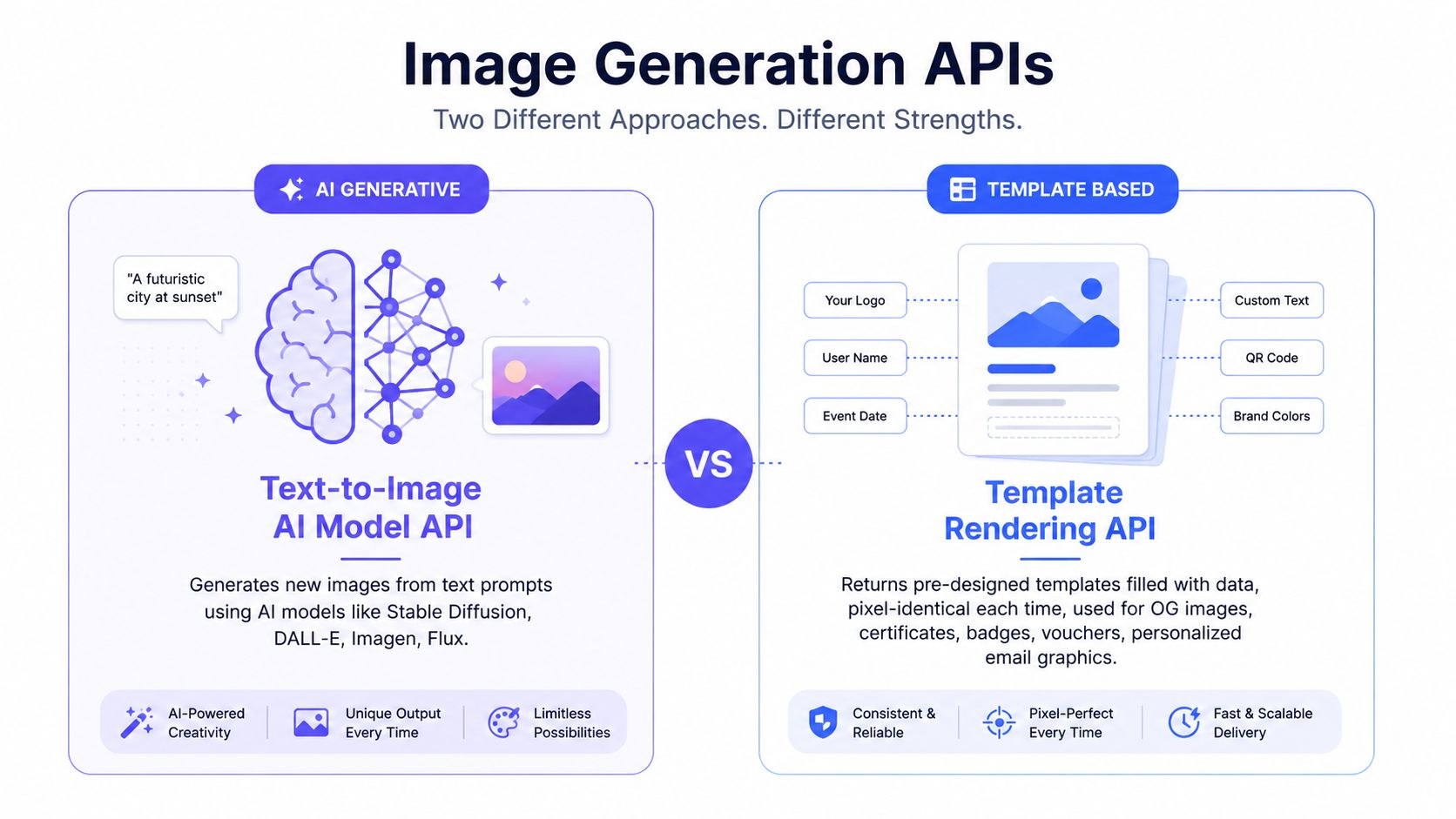
Table of Contents
- Two Meanings of Image Generation API
- What a Template Rendering API Does
- How Template-Rendering Vendors Differ by Workflow
- Single Render Request and Payload
- Batch Renders and Spreadsheet Workflows
- Operational Questions Buyers Should Ask
- Why Deterministic Templates Beat Prompts for Brand Assets
- Template Rendering vs HTML-to-Image
- Performance, Throughput, and Delivery
- Integration With Automation Tools
- Quick Reference Cheat Sheet
- Next Steps and Related Reading
Two Meanings of Image Generation API
Most confusion starts because vendors use the same phrase for two different systems. In one camp, an AI model takes a prompt and returns a probabilistic raster, which is useful for ideation and one-off visuals. In the other camp, a template renderer accepts structured data and returns the same design every time, which is what branded automation needs.
The split is practical, not semantic. A prompt model can improvise typography, composition, and imagery, but that same flexibility becomes a liability when a logo must stay aligned or a certificate name must not drift. A template renderer removes that risk by locking the visual system first and changing only the data.
Practical rule: If a designer owns the layout and a developer only swaps fields like a name, date, or code, the job belongs to a template renderer.
That’s why the rest of this reference stays on the deterministic side of the category. The overlap in marketing language is the problem, and the fix is to stop treating all image APIs as if they were interchangeable.
What a Template Rendering API Does
A template rendering API exists for repetitive, brand-controlled assets. The common use cases are OG images, certificates, badges, vouchers, and personalized email graphics, where the layout stays fixed and only the data changes. The output can be a raster image or a PDF, depending on the workflow.
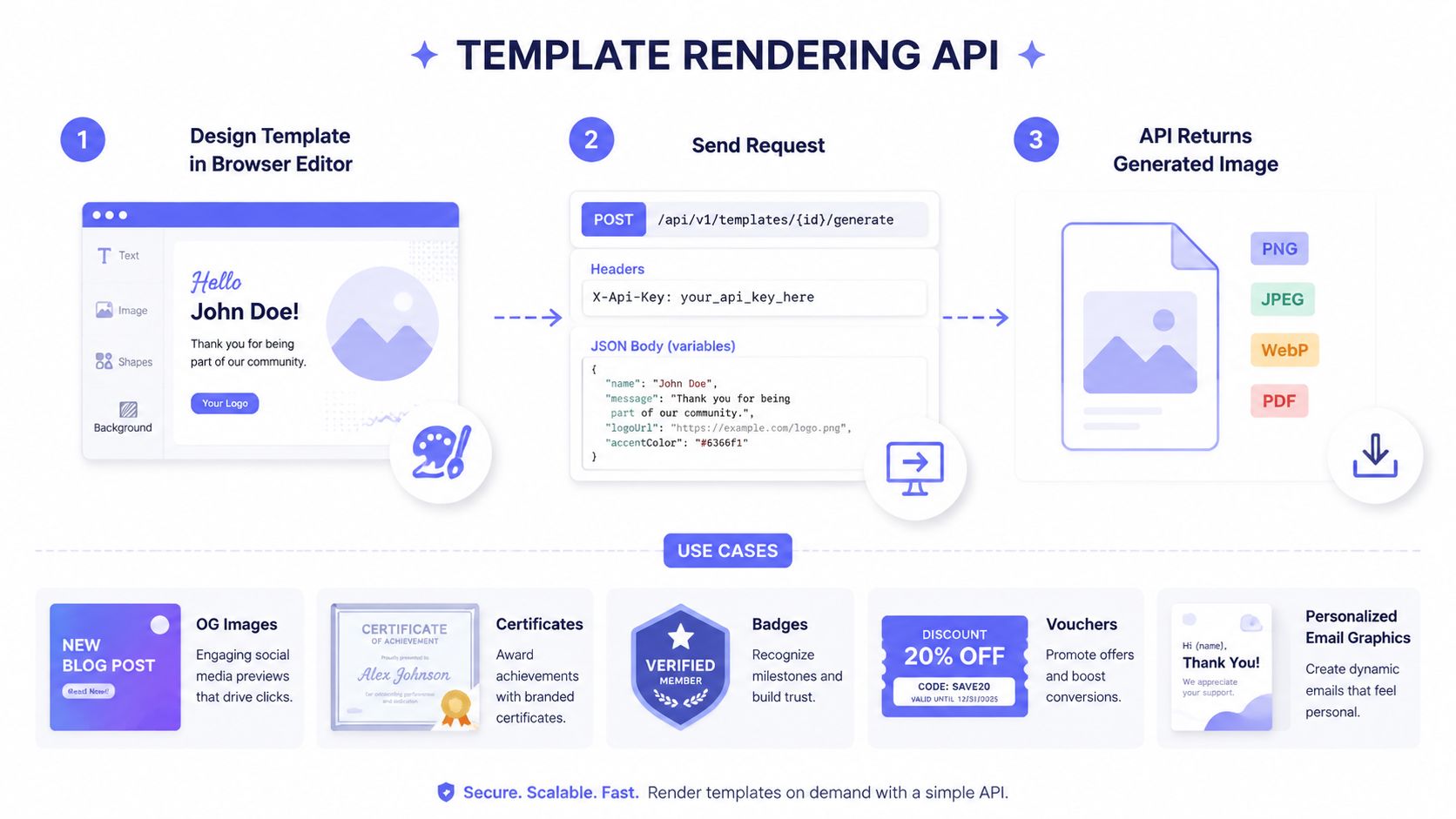
The request shape should be boring. A client sends POST /api/v1/templates/{id}/generate with an X-Api-Key header, then passes
variables as JSON so the service can bind each field into the template. The
response comes back as PNG, JPEG, WebP, or PDF, which covers
most web, email, and print pipelines.
The contract should stay explicit
The best implementation treats the template like a versioned product spec, not a loose design file. The payload should separate product-owned fields from provider-mapped fields, because reproducibility depends on the exact request context, not just the finished asset. Cloudinary’s guidance on image-generation APIs also recommends storing the prompt, source image, model settings, output metadata, and request IDs so the rendering history can be audited later, and that logic applies just as strongly to deterministic renderers that run inside automated pipelines. Cloudinary’s guidance on prompt versioning, metadata, and auditability
A clean rendering contract should also answer a few questions before the first request leaves the service:
- What fields are required? The API should reject missing variables before render time.
- What formats are valid? Teams need a fixed list, not guesses.
- How is delivery handled? Bytes are fine for direct embedding, hosted URLs are better for downstream sharing.
- What happens under review? High-stakes assets should go through human approval before publishing.
The important part is determinism. Same template, same data, same pixels. That’s the whole point.
How Template-Rendering Vendors Differ by Workflow
The category splits by workflow, not by marketing copy. Some tools are built for batch certificates and spreadsheet-driven jobs. Others are better for editor ergonomics or broader output support. Zandovi sits in the deterministic template-rendering group with a REST API, a browser editor, and batch rendering for OG images, certificates, and vouchers. Bannerbear, APITemplate.io, Placid, Templated, and Abyssale cover adjacent slices of the same problem.
| Vendor | Pricing Model | Free Tier | Output Formats | Batch Endpoint | Delivery Mode |
|---|---|---|---|---|---|
| Zandovi | Plan-based render quota | Yes | PNG, JPEG, WebP, PDF | Yes | Bytes or hosted URL |
| Bannerbear | Credit-based, “1 image = 1 credit” | Pricing page states monthly quota mechanics | Image outputs, including PDF support in some workflows | API-supported batch workflows | Hosted URL and API delivery model |
| APITemplate.io | Tiered subscription | Pricing page should be checked live | Image and document outputs | Batch-oriented workflows are documented | API delivery model with hosted assets |
| Placid | Subscription-based | Check live page for current availability | Marketing graphics and document outputs | Batch support varies by plan | Hosted delivery |
| Templated | Template editor plus API access | Check live page for current availability | Image, video, PDF | Workflow-based rendering | API render workflow |
| Abyssale | Subscription-based | Check live page for current availability | Marketing image outputs | Workflow support varies | Hosted delivery |
Bannerbear’s pricing page states “1 image = 1 credit”, and says the API monthly quota equals the number of new images that can be generated in a month. That makes volume the clearest buying signal for render-heavy teams. Bannerbear pricing
Templated’s workflow is straightforward. Create the template in the editor, get an API key, and call the render API for image, video, or PDF outputs. Templated workflow APITemplate.io follows the same basic pattern, a render-via-API workflow that takes a template and a JSON payload. APITemplate render API
For a tighter vendor-by-vendor breakdown, use the dedicated comparison at Zandovi vs APITemplate.io. That is the right place to compare workflow details without flattening the category into a generic feature checklist.
Where each vendor tends to win
- Zandovi: Better fit for batch certificates, vouchers, and other spreadsheet-shaped jobs because the plan structure is tied to render volume and batch rows.
- Bannerbear: Easier to evaluate when the team wants a simple credit mechanic and a broad existing ecosystem.
- APITemplate.io: Strong when editor ergonomics and render-via-API simplicity matter more than deep workflow tuning.
- Placid: Often shows up in marketing-graphics use cases where integration fit matters more than raw rendering mechanics.
- Templated: Useful when the workflow needs image, video, and PDF outputs from a design-first editor.
- Abyssale: Worth checking for marketing-asset automation needs, but the buying question stays the same, render model, delivery mode, and batch fit.
Buyers should compare pricing model, delivery mode, and batch behavior before they compare surface-level UI polish.
Single Render Request and Payload
A single render call is the workhorse endpoint. The request should be a plain
HTTP POST to a versioned render route with a template ID, a data object, and
an output selector, because that shape is easy to retry, log, and validate. The
client should send an authentication header, plus an idempotency key so a
network retry doesn’t create a duplicate render.
A practical payload looks like this:
curl -X POST "https://api.example.com/v1/render" \
  -H "Authorization: Bearer YOUR_API_KEY" \
  -H "Content-Type: application/json" \
  -H "X-Idempotency-Key: 550e8400-e29b-41d4-a716-446655440000" \
  -d '{
    "template_id": "tpl_12345",
    "data": {
      "recipient_name": "Amina Khan",
      "course_title": "Backend Systems",
      "date": "2026-08-28"
    },
    "format": "pdf",
    "width": 1200,
    "height": 630,
    "delivery": "url"
  }'
A successful URL-mode response should return a JSON envelope with a signed location, not raw pixels:
{
  "status": "success",
  "delivery": "url",
  "url": "https://cdn.example.com/renders/abc123.pdf"
}
Handle failures like an API, not like a UI
The difference between sync and async matters here. Sync mode is for quick, user-facing renders where the caller can wait for a result. Async mode is better when the asset is heavy or when downstream systems don’t need the file immediately. Validation should fail fast with field paths, quota issues should return a rate or credit error, and retries should be deliberate, not automatic noise.
The right response shape is the one that downstream systems can consume without guessing whether they got bytes, metadata, or a temporary URL.
The operational rule is straightforward. Use bytes when the image goes straight into another payload, use a hosted URL when the asset needs to live beyond the request, and keep idempotency on for every retryable request.
Batch Renders and Spreadsheet Workflows
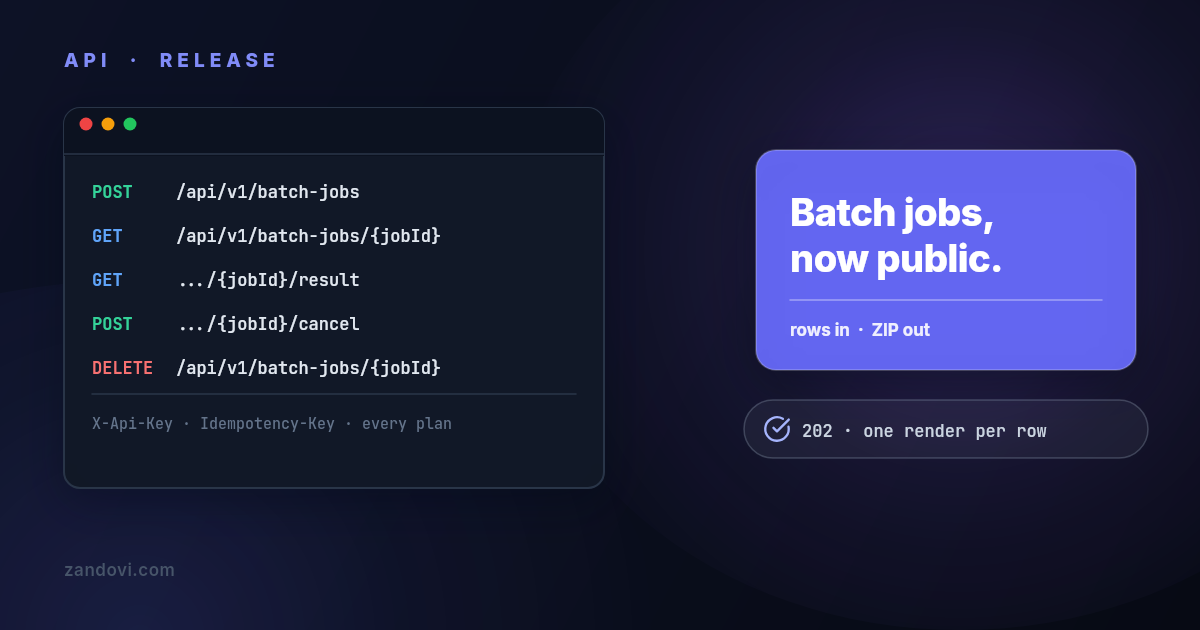
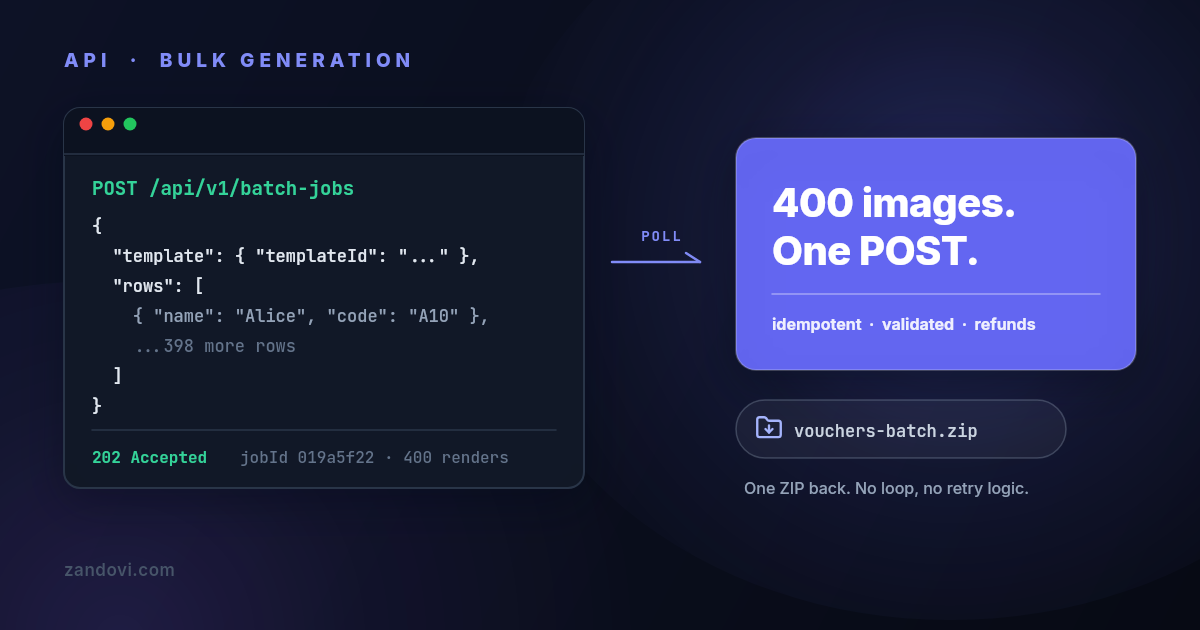
Batch rendering is where template APIs stop being a nice-to-have and become infrastructure. When the source of truth is a CSV, a form export, or a CRM list, the right shape is a batch endpoint that accepts a shared template ID and a rows array with per-record overrides. That is the only sane way to generate certificates, badges, vouchers, or event assets at scale.
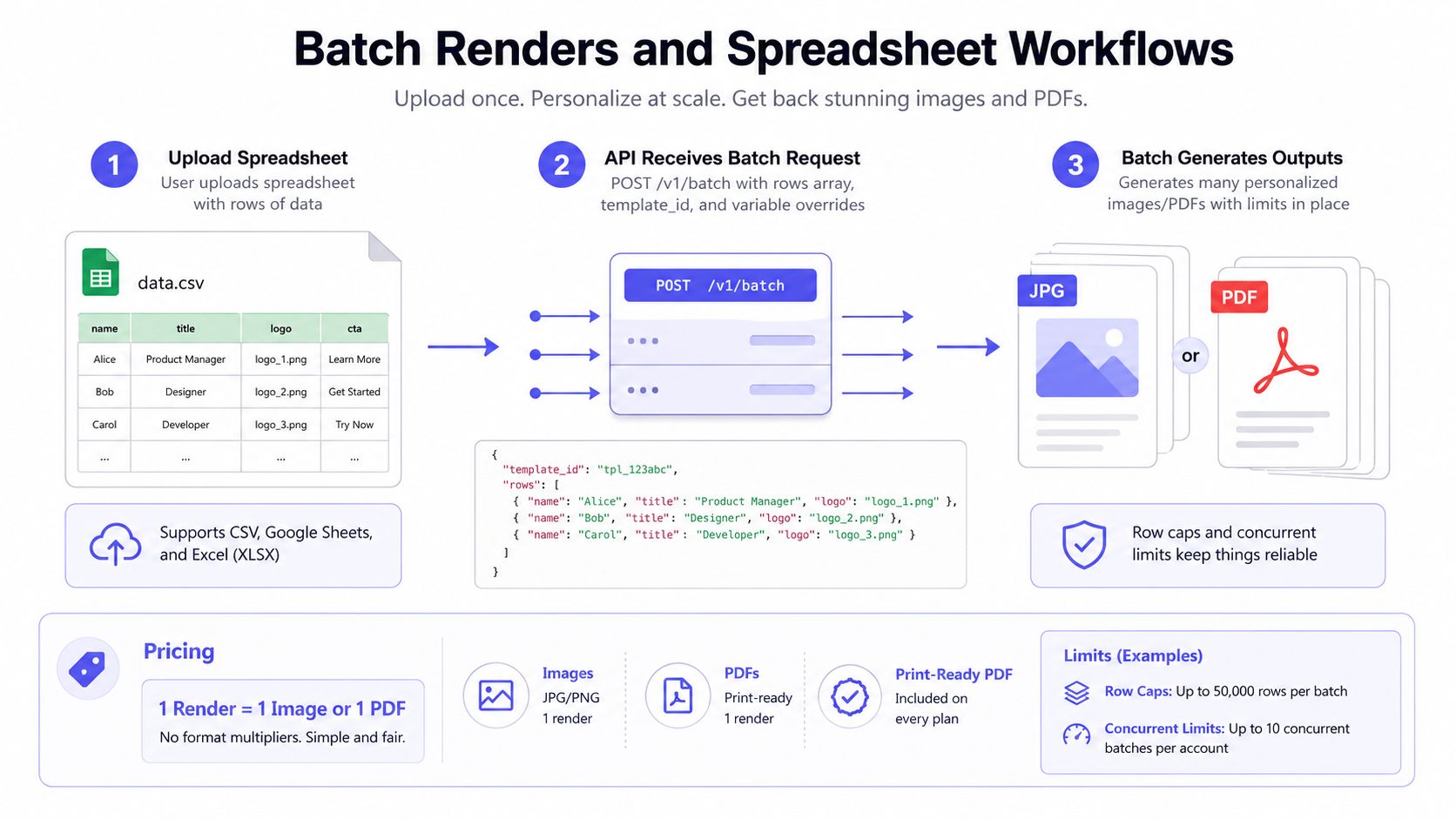
The spreadsheet-to-render pattern is especially useful for non-developers. A marketing ops lead can upload names and values, the service can validate each row, and the batch job can return a ZIP or a set of hosted files once the rows finish processing. The right public-facing workflow is described in Zandovi’s YouTube thumbnail template workflow, which is the kind of reusable template path teams need when a campaign ships in volume.
Batch systems should be explicit about failures
The batch contract should not pretend every row is equal. Some rows will fail validation, some will render cleanly, and some will need manual review before the job can be released. A good API keeps the row-level result visible so the caller can decide whether to rerun the bad records or discard them.
Operationally, the batch job should include these controls:
- Row identity: Each record should have a stable identifier so retries don’t duplicate work.
- Result visibility: Success and failure should be reported per row, not only at the job level.
- Completion signaling: Polling works, but a signed callback is cleaner for automation.
- Billing clarity: Failed renders should not be treated the same as completed ones.
That design keeps batch jobs predictable. It also avoids the common spreadsheet problem where a single malformed cell blocks every other record in the file.
Operational Questions Buyers Should Ask
The buying decision always comes down to the same checklist. Teams want to know the per-render cost, whether a free tier exists, which formats are native, how delivery works, and whether batch throughput matches their volume. Those are contract questions with a technical wrapper.
| Question | Vendor A | Vendor B | Vendor C |
|---|---|---|---|
| Pricing model | Zandovi uses plan-based render quotas, with Free $0, Personal $29, Studio $49, Team $79, and Business $199 | Bannerbear states “1 image = 1 credit” on its pricing page Bannerbear pricing | Templated exposes API access through a render workflow tied to its editor and plan structure Templated |
| Free tier | Yes, a permanent free plan exists | Check the current pricing page for live availability | Check the current pricing page for live availability |
| Output formats | PNG, JPEG, WebP, PDF Zandovi capabilities | Image and PDF workflows are documented on the pricing page | Image, video, and PDF are part of the product workflow |
| Delivery mode | Bytes or hosted URL Zandovi capabilities | Hosted URL and API delivery model | API render workflow with hosted output delivery |
| Batch throughput | Plan-gated batch rows per job are published on the product page | Batch handling exists, but buyers should verify current limits before purchase | Workflow-based, but throughput should be rechecked live |
Use the vendor page as a snapshot, not a promise. Procurement should recheck the live page before signing anything, because quota math and delivery behavior are the details that usually change first.
The operational questions that look boring often decide the purchase:
- Data retention: How long generated assets stay available.
- Regional handling: Whether storage and processing meet residency requirements.
- Compliance docs: Whether the vendor can produce the paperwork a security review expects.
- Custom assets: Whether uploaded fonts, logos, and source files count toward storage or quota.
The right filter is simple. If a vendor cannot answer these questions plainly, it is not ready for a production render workflow. With those questions on file, you can judge whether deterministic rendering fits your brand-asset needs.
Why Deterministic Templates Beat Prompts for Brand Assets
Brand assets need repetition, not surprise. Deterministic template rendering wins for OG images, certificates, badges, vouchers, and personalized email graphics because the same inputs always produce the same pixels. That consistency is the requirement, not a side benefit.
Text-to-image models make sense for mood boards, hero art, and other cases where
novelty matters more than repeatability. They’re the wrong choice when
typography, spacing, and logos have to stay locked. A template renderer keeps
the master design under human control and only exposes the safe variables, such
as {{recipient_name}}, {{course_title}}, and {{date}}.
If the team would be upset by a different font weight, shifted logo, or changed layout, it should not be a prompt-based workflow.
The decision rule is simple. If the asset must look the same tomorrow as it does today, bind it to a template. If uniqueness is the goal, let a model generate it.
| Asset Type | Recommended Approach | Reason |
|---|---|---|
| OG image | Template rendering | Needs repeatable branding and fixed dimensions |
| Certificate | Template rendering | Names, dates, and seals must stay aligned |
| Badge | Template rendering | Layout has to be stable across many records |
| Voucher | Template rendering | Codes and values need deterministic placement |
| Email hero graphic | Template rendering | Brand consistency matters more than novelty |
| Mood image | Prompt model | Creative variance is useful |
| Blog illustration | Prompt model | Unique art direction can help engagement |
For a practical example of the template side, Zandovi’s Open Graph template workflow shows the exact kind of locked-layout asset that belongs in this category.
Template Rendering vs HTML-to-Image
HTML-to-image tools solve a different problem. They rasterize arbitrary HTML and CSS, which is useful when a team already has a page or component that needs to become an image. The tradeoff is operational weight, because browser-based rendering means font installs, layout drift, and more moving parts.
Template renderers are tighter. They accept a constrained JSON payload, validate fields before render time, and keep the design locked inside a template contract. That makes them easier to reason about when the same asset is generated repeatedly from structured data.
| Dimension | Template Rendering API | HTML-to-Image |
|---|---|---|
| Input shape | Structured fields against a known template | Arbitrary HTML and CSS |
| Determinism | High, same inputs produce the same output | Lower, browser quirks can shift pixels |
| Operational burden | Lower, no browser fleet | Higher, browser runtime needs care |
| Best use case | Certificates, badges, vouchers, OG images | Bespoke pages, complex DOM layouts |
Pick HTML-to-image when the layout already exists as web code and the team needs pixel capture from that code. Pick template rendering when the asset is repeated, branded, and parameterized. That’s the difference that matters.
Performance, Throughput, and Delivery
Renderer architecture drives latency more than the template itself. Lightweight template engines are a better fit for low-latency image work because they don’t need to boot a browser process for every render. Browser-based stacks carry more overhead and make throughput planning messier.
Batch jobs should run in worker pools with stable retry rules. A team should
send a stable render_id or idempotency token for each logical asset, store the
returned URL against that key, and retry only on transient errors. That keeps
retries from becoming duplicate renders.
Hosted delivery is usually the cleaner path for scale. The API can return a stable URL that downstream systems cache, proxy, or pass to another service without decoding binary blobs. Bytes mode still matters for one-off email embeds and direct file handoffs.
Operational rule: Bytes are for immediate consumption, URLs are for everything that outlives the request.
Integration With Automation Tools
n8n, Make, and Zapier all handle this the same way when there’s no first-party
node. The workflow uses an HTTP Request or Webhooks module, sends POST
to the render endpoint, and includes the API key in the authorization header.
The payload stays in JSON, because that’s the easiest format for template
variables.
For single renders, the node should be configured to accept a binary response if the downstream step needs raw pixels. For batch jobs, the automation should send the row array, wait for the completion callback, and then iterate the returned URLs into storage, email, or messaging actions. Error handling should branch immediately on 4xx validation errors, then retry 429 and 5xx responses with backoff.
| Field | n8n HTTP Request node | Zapier Webhooks action | Make HTTP module |
|---|---|---|---|
| Method | POST | POST | POST |
| URL | Render endpoint | Render endpoint | Render endpoint |
| Headers | Authorization, Content-Type, Idempotency-Key | Authorization, Content-Type, Idempotency-Key | Authorization, Content-Type, Idempotency-Key |
| Body | JSON template ID and variables | JSON template ID and variables | JSON template ID and variables |
| Response handling | Binary for bytes, JSON for URL mode | JSON or file handling | JSON or file handling |
The important part is credential hygiene. The API key belongs in the platform vault, not inside node fields that get copied around by accident.
Quick Reference Cheat Sheet
Use the single-render endpoint for one asset and the batch endpoint for rows. Keep the headers consistent, keep the payload explicit, and decide delivery mode before implementation starts.
- Single render endpoint:
POST /api/v1/templates/{id}/generate - Batch endpoint:
POST /api/v1/render/batch - Headers:
Authorization,Content-Type: application/json,Idempotency-Key - Payload keys:
template_id,format,width,height,variables - Delivery modes:
bytesfor inline consumption,urlfor hosted delivery - Common status codes:
200,400,402,429,500
That’s the shape worth pinning in a team wiki. If the vendor can’t support it cleanly, the integration will become custom glue fast.
Next Steps and Related Reading
A clean shortlist starts with one live test render, then one batch test against real spreadsheet rows. For deeper buying work, compare the bulk workflow guide at bulk image generation API and the pricing breakdown at image generation API pricing 2026, then pin this reference in the engineering wiki before procurement starts.