Bulk Image Generation Without the Loop: One POST, One ZIP
- 22 Aug, 2026
You have a template and a few hundred rows of data. A voucher per customer, a
badge per attendee, that kind of job. The obvious move is a for loop around a
render endpoint, and the obvious move works right up until it doesn’t.
The loop hits the per-second rate limit, so you add a sleep. Some requests time out, so you add retries. A retry lands on a request that actually succeeded, so now you’ve paid for the same image twice and you add your own deduplication layer. Request 217 of 400 fails on a bad row, so you write bookkeeping to know where to resume. Then you collect 400 responses into files, name them, and zip them yourself.
None of that is image generation. All of it is your code now.
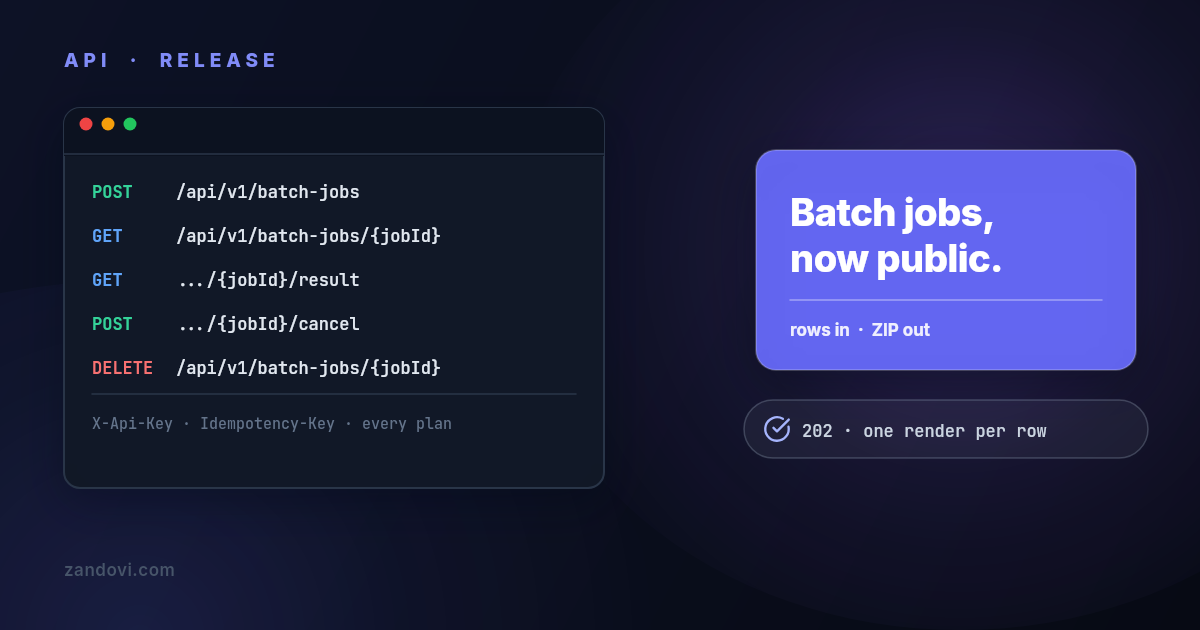
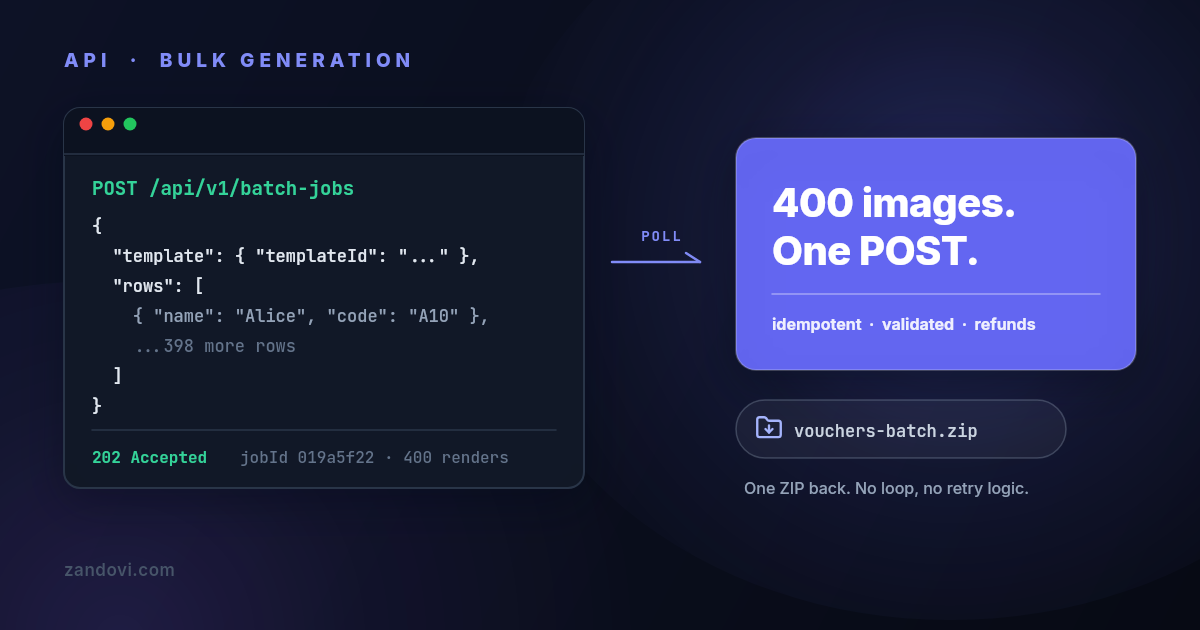
Zandovi’s batch endpoint exists so you don’t write any of it. You POST the rows once, the service renders them all, and you download a single ZIP. This post walks through the whole flow and the details that make it safe to call from automation: idempotent retries, validation before billing, and refunds when you cancel.
The shape of a batch job
Three requests, start to finish:
POST /api/v1/batch-jobswith a template ID and a rows array. You get202 Acceptedand a job ID back immediately.GET /api/v1/batch-jobs/{jobId}until the status turnsCOMPLETED.GET /api/v1/batch-jobs/{jobId}/resultfor a download URL, or the ZIP bytes directly.
Each row is one rendered image, and each row costs one render from your monthly quota, the same as one call to the single-render endpoint. A 400-row job is 400 renders, charged when the job is accepted.
Submitting the job
Every row is an object mapping variable names to values, exactly the shape the
single-render endpoint takes in variables. Format and render options are set
once, on the job, because rows differ only in data:
curl -X POST https://app.zandovi.com/api/v1/batch-jobs \
  -H "X-Api-Key: $ZANDOVI_API_KEY" \
  -H "Content-Type: application/json" \
  -H "Idempotency-Key: spring-vouchers-2026" \
  -d '{
    "template": {
      "templateId": "019463b8-1234-7890-abcd-ef1234567890",
      "format": "png",
      "options": { "scale": 2 },
      "output": { "filenamePattern": "{voucher_code}" }
    },
    "rows": [
      { "first_name": "Alice", "voucher_code": "ALICE10" },
      { "first_name": "Bob",   "voucher_code": "BOB20" }
    ]
  }'
{
"jobId": "019a5f22-4c1e-7d90-b3a8-6f2e91c04d77",
"status": "PENDING",
"totalItems": 2,
"createdAt": "2026-08-11T10:00:00Z"
}The detail that does the most work here: validation runs before
billing. Every row is checked against the template’s variable rules at
submission. If row 217 is missing a required value or carries barcode data that
won’t encode, the whole submission is rejected with a 400 naming the row, no
job is created, and nothing is charged. You fix the row and resubmit. The
half-finished batch, the one where you’re not sure which rows rendered before it
died, doesn’t exist in this flow.
Polling until it’s done
curl https://app.zandovi.com/api/v1/batch-jobs/$JOB_ID \
  -H "X-Api-Key: $ZANDOVI_API_KEY"
The status response carries totalItems, completedItems, failedItems, and
an errors array with per-row messages, so a progress bar is free. Statuses run
PENDING, PROCESSING, and then one of COMPLETED, FAILED, or CANCELLED.
The inline errors array is capped at the first five failures — failedItems
carries the true count, and GET /batch-jobs/{jobId}/items carries the whole
list, one entry per submitted row with its filename, size and error.
Status reads sit in a separate, much higher rate tier than submissions (100 per second versus 1 per second), so polling every couple of seconds is fine. In Node, the whole flow is about twenty lines:
const BASE = "https://app.zandovi.com/api/v1";
const headers = {
  "X-Api-Key": process.env.ZANDOVI_API_KEY!,
  "Content-Type": "application/json",
};

async function renderBatch(templateId: string, rows: Record<string, string>[]) {
  const submit = await fetch(`${BASE}/batch-jobs`, {
    method: "POST",
    headers: { ...headers, "Idempotency-Key": `batch-${templateId}-${rows.length}` },
    body: JSON.stringify({ template: { templateId, format: "png" }, rows }),
  });
  const { jobId } = await submit.json();

  while (true) {
    await new Promise((r) => setTimeout(r, 2000));
    const job = await (await fetch(`${BASE}/batch-jobs/${jobId}`, { headers })).json();
    if (job.status === "COMPLETED") break;
    if (job.status === "FAILED" || job.status === "CANCELLED")
      throw new Error(`Batch ${job.status}: ${JSON.stringify(job.errors)}`);
  }

  const result = await (
    await fetch(`${BASE}/batch-jobs/${jobId}/result`, { headers })
  ).json();
  return result.downloadUrl; // valid for 1 hour; fetch again for a fresh one
}
One wrinkle worth knowing: calling the result endpoint before the job finishes
returns 409 with code: BATCH_RESULT_NOT_READY, deliberately distinct from
404. Your code can tell “keep waiting” from “this job is gone” without
guessing.
Or let the job call you
The loop above is fine for a script you’re watching. For anything that runs
unattended, hand the submission a callbackUrl and skip the waiting entirely:
await fetch(`${BASE}/batch-jobs`, {
  method: "POST",
  headers: { ...headers, "Idempotency-Key": `batch-${templateId}-${rows.length}` },
  body: JSON.stringify({
    template: { templateId, format: "png" },
    rows,
    callbackUrl: "https://example.com/hooks/zandovi",
  }),
});
When the job reaches COMPLETED, FAILED or CANCELLED, Zandovi POSTs a
summary to that URL — deliveryId, jobId, status and the final counters.
No download URL is in the body on purpose: result links expire after an hour
and a retried delivery would arrive carrying a dead one, so your handler calls
the result endpoint for a fresh link when it’s actually ready to collect.
Verify the delivery before you act on it. Each one carries
X-Zandovi-Signature: t=<unix-seconds>,v1=<hex>, where the hex is
HMAC-SHA256(secret, t + "." + rawBody). The secret is per organization, lives
in the app under Settings → API Keys, and is not your API key. Three things
break verification quietly: re-serializing the body before hashing it (read the
raw bytes), comparing with === instead of a constant-time compare, and
accepting stale timestamps. Delivery is at-least-once with five attempts over
roughly fifteen minutes, so deduplicate on deliveryId and return 2xx as
soon as you’ve durably accepted the payload — a handler that renders or emails
inline will hit the ten-second timeout and be retried even though it worked.
If a delivery gives up, the job says so: GET /batch-jobs/{jobId} carries a
completionCallback object with the attempt count and the last error. Worth
checking, because bounded retries mean an endpoint that refused every attempt
otherwise looks identical to a job that never finished. The full rules are in
Completion Callbacks.
The retry that doesn’t cost you twice
The single-render endpoint has no server-side deduplication. Call it twice and you pay twice, which is why the automation platform guide spends three paragraphs on guarding your own retries.
Batch submissions fix this properly. Send any string in the Idempotency-Key
header, and a retry of the same submission with the same key returns the
original job: the same jobId comes back, and nothing renders or bills twice.
This holds even when two retries race each other, because the deduplication is
enforced by a unique index in the database rather than by application code
checking first and inserting second.
Two rules keep it honest. One key belongs to one submission, so reusing a key
with a different template, row count, format, or filename pattern is rejected
with 409 BATCH_IDEMPOTENCY_KEY_REUSED instead of silently returning the wrong
job. And the comparison is structural: the server matches the submission’s
shape, not every row byte, so don’t recycle yesterday’s key for today’s data.
Derive the key from the thing the batch represents, like payroll-aug-2026 or
an order ID, and reuse it only when retrying that exact batch.
If your code has any retry path at all, and it does, send the header.
Files named from your data
By default the ZIP contains image-000.png, image-001.png, and so on, which
is fine until you need to match file 217 to a person. Set a filename pattern
instead:
"output": { "filenamePattern": "{voucher_code}" }Any row variable works as a placeholder, plus {index}, {timestamp}, and
{random}. Values are lowercased and unsafe characters become hyphens. Skip the
extension; the format’s own extension is appended, so {voucher_code}.png
would come out as alice10.png.png.
If two rows produce the same filename, the later ones get a suffix,
ticket.png then ticket-2.png. That rule sounds minor and isn’t: it means an
archive can never silently contain fewer files than the rows you paid for.
Cancelling, and what it refunds
POST /api/v1/batch-jobs/{jobId}/cancel stops an active job and refunds every
render that hadn’t completed, totalItems minus completedItems, back to your
quota. Submit 400 rows, cancel at 150 done, get 250 renders back. Cancelling a
job that already finished is a no-op that refunds nothing, and the accounting is
race-safe: a cancel that arrives just as the job completes doesn’t refund work
that was actually delivered.
Deleting is separate. DELETE removes a finished job and its archive but never
refunds; cancellation is the operation that settles the bill.
When the loop is still right
A batch job is for many images from one template, now. It’s the wrong shape for one image per event: a voucher the moment someone signs up, an OG image when a post publishes, a ticket when someone pays. Those want the single-render endpoint called from the event, one POST, bytes back. The OG image guide and the spreadsheet-to-API section of the certificates guide cover that shape.
The dividing line: if you’d be writing a loop, it should be a batch job. If there’s no loop, it shouldn’t be.
What this doesn’t do
One template per job. Rows vary the data, not the design. Rendering three different templates is three jobs.
Row caps are per plan: 25 rows per job on Free, 100 on Personal, 200 on Studio, 300 on Team, 400 on Business. Bigger datasets get split into multiple jobs, and you can have two active jobs at a time.
The result URL expires after an hour. That’s a fresh-URL-on-request design, not
image hosting; ask again for another one. The archive behind it is kept for 30
days after the job finishes, then deleted — the download answers 410
BATCH_RESULT_EXPIRED rather than a bare 404, and the job’s counters and
per-row outcomes stay readable indefinitely. Copy the ZIP into your own storage
if you need it longer. If you need individually hosted images rather than a
ZIP, that’s what share links are for.
What this costs
One render per row, from the same monthly pool as every other render. The free plan’s 100 renders cover a real test batch of 25 rows four times over. Personal at $29/month is 5,000 renders with 100-row jobs, and the caps rise from there. Cancelled rows come back; the quota only keeps what was actually rendered.
The batch rendering reference documents all seven endpoints, every error code, and the full filename pattern rules, and Completion Callbacks covers signing and retries. For why the API is shaped this way, see the launch note.