Zandovi — Design once. Generate thousands.

Zandovi is a web-based design platform that combines a full visual editor with variable placeholders ({{name}} syntax) and CSV-driven batch generation. Marketing and ops teams use it to produce personalized event badges, certificates, gift cards, tickets, coupons, and social-media images at scale — one design, thousands of outputs. Developers use the public API to generate dynamic images server-side. Key features: 200+ templates across 18 categories, 48 Google Fonts included, QR codes and barcodes, PNG/JPEG/WebP/PDF export up to 4096×4096, multi-tenant organizations with roles. Currently in private beta — join the waitlist.

Zandovi · Now in early access
Why Zandovi

Stop making the same design 100 times.

Dynamic variables

One template. A thousand outputs.

Batch generation

Upload a CSV. Download a ZIP.

Developer API

A REST API for personalized graphics.

Your data lives in a spreadsheet — your design tool doesn’t know that. Zandovi binds a template to your data and renders a personalized gift card, badge or certificate for every row. Design once, generate thousands.

Free forever plan No credit card 200+ templates included
zandovi.com / The Ember Table / Menu Card
Layers · 10
Circle
T The Ember Table
Line
T $18
T Citrus quinoa…
T Smoked Salmon Bowl
T Chef's Pick
Rectangle
🖼 Image
1080 × 1080 · 60%
T $18 {{price_var}}
text · 320 × 72 · Variable bound
Design Typography Variable
Binding
Name
price_var
Type
Text
Default value
$18
Constraints
RequiredYES
Batch · 3 of 400 rows
# price_var name_var rest_var
1 $18 Smoked Salmon Bowl The Ember Table
2 $24 Truffle Risotto Bowl Casa Verde
3 $15 Charred Octopus Bowl Mar y Sol
+ 397 more rows
members.csv
100 rows
Menu Card · v2
3 variables
output.zip
100 PNGs · 4 MB
Rendering 100 / 100 COMPLETED
4 parallel workers · 18s elapsed Download ZIP →
POST /api/v1/templates/:id/generate
curl -X POST '\
  /api/v1/templates/019e4953-7ffb/generate' \
  -H 'Content-Type: application/json' \
  -H 'X-Api-Key: YOUR_API_KEY' \
  -d '{
    "variables": {
      "price_var": "$18"
    },
    "format": "png",
    "options": {
      "outputDpi": 96,
      "quality": 90
    }
  }' \
  --output generated-image.png

# → 200 OK · image/png · streamed to disk
The problem

Personalized designs shouldn’t be manual work.

If any of these sound familiar, Zandovi was built for you — same design, same data, none of the repetition.

The copy-paste afternoon

“Change the name, export, repeat — 300 times.”

With Zandovi: Bind the fields that change to {{variables}} and let a CSV do the repeating. One batch job returns all 300 finished designs as a ZIP — minutes, not an afternoon.

The designer bottleneck

“Every asset waits on the one person with the source file.”

With Zandovi: Brand-locked templates let teammates change the data, never the design. Names, prices and photos rotate — layout, fonts and logo stay untouched.

The DIY rendering stack

“We run a headless browser just to make PNGs.”

With Zandovi: One POST with JSON returns a rendered PNG, JPEG, WebP or print-ready PDF up to 4K. No browser fleet, no SDK, nothing to maintain.

Built for…

Whatever you're making — at any scale.

Four audiences, one pattern: a repetitive design job goes in, finished output comes out. Pick yours.

Ship a personalized graphic for every customer.

Hand-assembling birthday emails, anniversary coupons and win-back posts stops scaling after a dozen customers. With a brand-locked template and a CSV, every customer gets an on-brand graphic — and nobody opens a design tool.

  • Brand-locked templates your team can fill in but not break.
  • Bulk-generate up to 400 personalized social posts from a CSV.
  • Schedule auto-renders triggered by your CRM or marketing tool.
Try it free
Batch · 3 of 400 rows
# price_var name_var rest_var
1 $18 Smoked Salmon Bowl The Ember Table
2 $24 Truffle Risotto Bowl Casa Verde
3 $15 Charred Octopus Bowl Mar y Sol
+ 397 more rows

A REST API for dynamic images.

Skip building a headless-browser rendering stack. Per-org API keys, stable schemas, up to 4K PNG/JPEG/WebP/PDF — one POST per image.

  • POST a JSON payload, get back an image — no cold starts, always fast.
  • Always-on API with consistent low latency, zero serverless spin-up time.
  • Fire parallel requests simultaneously and render multiple images at once.
Try it free
POST /api/v1/templates/:id/generate
curl -X POST '\
  /api/v1/templates/019e4953-7ffb/generate' \
  -H 'Content-Type: application/json' \
  -H 'X-Api-Key: YOUR_API_KEY' \
  -d '{
    "variables": {
      "price_var": "$18"
    },
    "format": "png",
    "options": {
      "outputDpi": 96,
      "quality": 90
    }
  }' \
  --output generated-image.png

# → 200 OK · image/png · streamed to disk

Menu cards, coupons, gift cards — done.

A price change shouldn’t mean redoing the whole menu. Design each card once — then swap photos, prices and names without ever touching the design again.

  • Update one price in your CSV → every menu card reprinted.
  • Print-ready PDF export at 300 DPI for the local print shop.
  • 200+ starter templates: gift cards, coupons, business cards.
Try it free

400 badges. 4 minutes.

Badge day before the conference used to be an all-hands afternoon. Upload the attendee list — badges, certificates and ticket QRs come back generated, downloaded, printed.

  • QR codes bound to attendee IDs render with the badge.
  • Certificate PDFs with embedded fonts, print-shop ready.
  • Bulk download as ZIP, or push direct to your fulfilment API.
Try it free
members.csv
100 rows
Menu Card · v2
3 variables
output.zip
100 PNGs · 4 MB
Rendering 100 / 100 COMPLETED
4 parallel workers · 18s elapsed Download ZIP →
Capabilities

Everything you need to design at scale.

From the canvas to the CSV to the API — Zandovi covers the whole pipeline from one design to a million personalized outputs.

Visual canvas editor

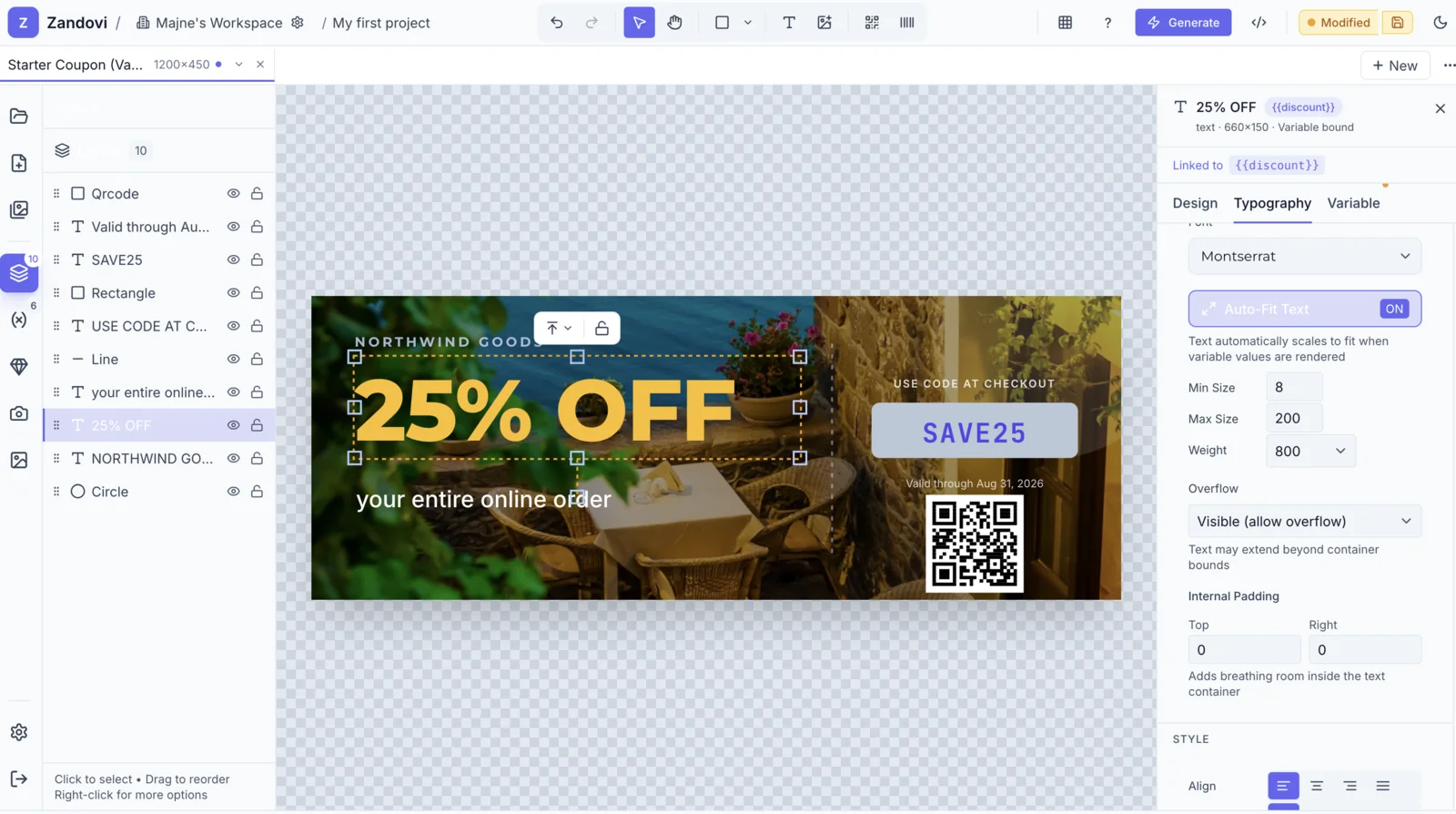
Shapes, text, images, lines, arrows, stars, polygons, freehand draw, QR codes and barcodes — with a full layers panel, smart guides, and 50-step undo.

Learn more

{{variable}} placeholders

Bind any text, image, QR, or barcode to a typed variable. Text, number, date, email, URL — with validation rules and default values.

Learn more

CSV → ZIP batch

Drop a spreadsheet, get a zipped folder of personalized designs. Up to 100 rows per job by default, more on Team plans.

Learn more

Public REST API

Per-org API keys. Generate single images or trigger batch jobs from any backend, in any language.

Learn more

200+ templates

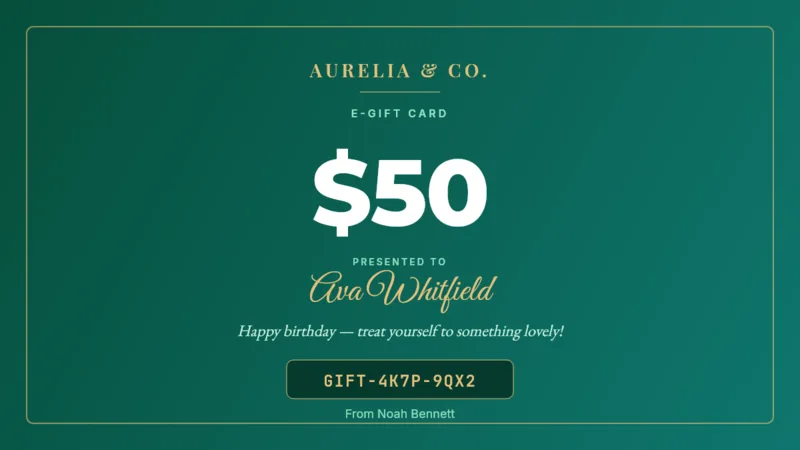
Gift cards, coupons, certificates, business cards, tickets, social posts, birthday cards. Edit any one, save your own, share with your team.

Learn more

Multi-tenant teams

Personal and team organizations. Owner / admin / member roles. Email invitations. SSO and audit logs on Team plan.

Learn more

QR codes & barcodes

CODE128, EAN-13, UPC, CODE39, ITF-14. QR with error-correction, logo overlay, custom colors. Bind each to a variable for dynamic codes.

Learn more
/ guyg's Workspace / jho
T
?
Generate
Modified
Upgrade
Menu Item Card44 1080×1080
New
···
10
1
Layers 10
Circle
T The Ember Table
Line
T $18
T Citrus quinoa, av…
T Smoked Salmon…
T Chef's Pick
Rectangle
Image
Rectangle
T Smoked Salmon Bowl
text · 960×100
Text Content
Smoked Salmon Bowl
Design
Typography
Font
Font
Playfair Display
Auto-Fit Text Auto-scale text to fit container
OFF
Size
56
Weight
Bold
Internal Padding
Per Side
0
Adds breathing room inside the text container
60% — + Canvas: 1080 × 1080 · Elements: 10 v6113ef0a · Text · 60, 532
Visual canvas editor

A real design canvas,
not a template filler.

Shapes, text, images, QR codes, barcodes — every tool you expect from a modern design environment, right in your browser. With variables and batch generation built in.

  • Full layers panel — visibility, lock, drag-to-reorder, 50-step undo.
  • 48 fonts, smart alignment guides, snap-to-grid, freehand draw, QR codes & barcodes.
  • Bind any element — text, image, QR or barcode — to a {{variable}} for batch generation.
Built-in asset library

Millions of photos,
zero tab-switching.

Search Unsplash, Pexels and Pixabay directly inside the editor. Find the right image, click once, done — no account needed, no separate app.

  • Search 1,844+ images from three top libraries — all from one panel inside the editor.
  • One-click insert straight onto your canvas. No downloading, no re-uploading.
  • Bind any photo to a {{variable}} for per-row image swaps in batch jobs.
Sources:
Unsplash
·
Pexels
·
Pixabay
Learn about images
zandovi.com / editor · stock images
Stock Images
1,844
salmon
Batch generation

From one template to thousands — in four steps.

Personalized event badges, certificates, gift cards or menu boards. Same workflow every time.

Read the batch generation guide
  1. Design once

    Build your template in the editor. Drop in shapes, text, an image, a QR.

  2. Add variables

    Wrap any text or image binding in {{double_braces}}. Set defaults and validation.

  3. Upload your CSV

    One column per variable, one row per output. We download a starter CSV for you.

  4. Get a ZIP

    PNG, JPEG or WebP at up to 4K, scale up to 4×, parallel-rendered in seconds.

members.csv
100 rows
Menu Card · v2
3 variables
output.zip
100 PNGs · 4 MB
Rendering 100 / 100 COMPLETED
4 parallel workers · 18s elapsed Download ZIP →
Templates

200+ templates. 18 categories. One click away.

Gift cards, coupons, tickets, certificates, social posts, birthday cards, business cards. Open any one and edit, or save your own to your workspace.

-50% Flash Sale
20% OFF Coupon
$100 Gift card
HELLO Event badge
🎂 Birthday
70% Black Friday
Certificate
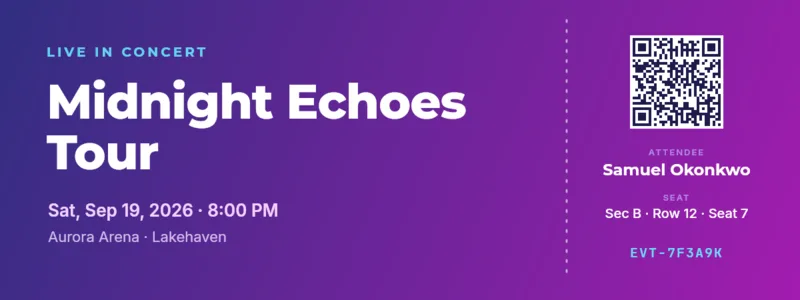
#1284 Ticket
Developers

One POST. One personalized image.

No headless browser. No SDK to install. Skia-based, server-side renderer. PNG, JPEG, WebP, or print-ready PDF up to 4096 × 4096 px at 300 DPI.

  • Per-organization API keys with usage tracking
  • Template + project-level generate endpoints
  • Schema introspection — describe variables before sending
  • Sub-second renders at 1080p with Redis caching
Read the API docs
POST /api/v1/templates/:id/generate
curl -X POST '\
  /api/v1/templates/019e4953-7ffb/generate' \
  -H 'Content-Type: application/json' \
  -H 'X-Api-Key: YOUR_API_KEY' \
  -d '{
    "variables": {
      "price_var": "$18"
    },
    "format": "png",
    "options": {
      "outputDpi": 96,
      "quality": 90
    }
  }' \
  --output generated-image.png

# → 200 OK · image/png · streamed to disk
Plans

Pricing that scales with you.

Start free. Upgrade when you need more renders, seats, larger prints, or bigger batch jobs. Prices exclude VAT / sales tax.

Free

For trying Zandovi.

$0

Free forever

  • 100 renders / mo — one shared pool
  • 1 seat
  • 1 project · 5 templates
  • Prints to A5 / postcards (300 DPI)
  • 25 batch rows per job
  • Full API + all formats (print-ready PDF)
  • Community support
Join the waitlist

Studio

For a small team or studio.

$49 /mo

billed monthly

  • 12,000 renders / mo
  • Unlimited web renders*
  • 3 seats — roles & shared workspaces
  • Unlimited projects & templates
  • Prints to A3 / large-format (8K)
  • 200 batch rows per job
  • Everything in Personal
  • Email support
Join the waitlist

Team

For collaborating teams.

$79 /mo

billed monthly

  • 25,000 renders / mo
  • Unlimited web renders*
  • 5 seats — roles & shared workspaces
  • Prints to A3 / large-format (8K)
  • 300 batch rows per job
  • Everything in Studio
  • Priority email support
Join the waitlist

Business

For high-volume operations.

$199 /mo

billed monthly

  • 100,000 renders / mo
  • Unlimited web renders*
  • 10 seats — roles & shared workspaces
  • Prints to A3 / large-format (8K)
  • 400 batch rows per job
  • Everything in Team
  • Priority email support
Join the waitlist

* Unlimited web renders — on every paid plan, exporting by hand from the editor is unlimited and never counts against your monthly render quota. We only meter automation: API calls and CSV batch rows. Fair-use rate limits apply.

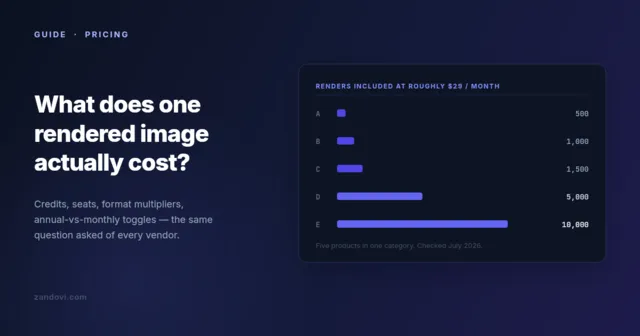
All prices exclude VAT / sales tax, which is calculated and added at checkout based on your location. 1 render = 1 image or 1 PDF — no format multipliers. Failed renders are automatically refunded to your quota.

Early access

Join the waitlist.

Zandovi is in private beta. Drop your email and we'll send you an invite when a slot opens.

No spam. One invite email, then you're in. Unsubscribe any time.

Questions

Frequently asked.

Everything you'd want to know before trying Zandovi.

How does batch generation work?
Design a template with variables using {{name}} syntax, upload a CSV with your data, and Zandovi generates a personalized export per row. Download everything as a ZIP.
What export formats are supported?
PNG, JPEG, WebP and PDF at up to 4096×4096 px with full quality control. Each format supports scale multipliers for print-ready output.
Is there an API?
Yes. Public API keys let you generate designs server-side from any language. Perfect for sending personalized email graphics, order confirmations, or dynamic social images.
How do teams and organizations work?
Invite teammates to a shared organization. Control member roles, share templates and projects across the team, and scope billing per org. Each user can belong to multiple organizations.
What about QR codes and barcodes?
Both are first-class citizens. Drop a QR or barcode element onto any template, bind it to a variable, and every generated design gets its own scannable code.
Learn more

Everything about Zandovi, in one place.

A categorized reference covering features, use cases, the API, billing and teams. Expand a category to read the detail.

Browse the full documentation
Getting started The basics of Zandovi.
5 items
What is Zandovi?
Zandovi is a web-based design platform that combines a full visual editor with variable placeholders ({{name}} syntax) and CSV-driven batch generation. You design a template once, then generate hundreds or thousands of personalized images from a spreadsheet or via the API.
Who is Zandovi for?
Marketing and ops teams making personalized graphics at scale, developers integrating dynamic images into their products, small businesses creating menu cards, gift cards and coupons, and event organizers producing badges, certificates and tickets.
How do I sign up?
Zandovi is in private beta. Join the waitlist with your email. Once invited, you can sign up with email, Google OAuth, or a WebAuthn/FIDO2 passkey.
Is there a free plan?
Yes. The Free plan includes one workspace, five templates, and PNG export up to 1080p. No credit card is required to use it.
What does Zandovi cost?
Pricing will be announced before the public launch. Join the waitlist to be notified first.
Visual editor Drawing tools, canvas controls, and the editor UX.
7 items
What drawing tools does the editor have?
Rectangle, circle, ellipse, line, arrow, star, polygon (variable sides), triangle, curved rectangle, text, image, hand/pan, freehand draw, QR code and barcode. Each tool has its own configuration panel.
What canvas sizes are supported?
Any custom width × height in pixels. Built-in presets cover business cards (US and EU), gift cards (regular and large), coupons, tickets, social-media formats and A-series paper sizes.
Can I zoom in and out on the canvas?
Yes — zoom from 10% up to 400% with pan/scroll navigation. There is also a grid overlay with configurable snap-to-grid spacing, ruler display on the top and left edges, and smart vertical/horizontal alignment guides shown while dragging.
How many undo steps does Zandovi support?
The editor keeps 50 steps of undo/redo history for every canvas operation.
Can I change the canvas background?
Yes. Backgrounds can be a solid color, a linear gradient, a radial gradient, or an image fill. The gradient editor supports multiple color stops and configurable start/end points.
Does Zandovi support dark mode?
Yes, the editor and the marketing site both support a dark theme. Your preference is stored locally.
Are there keyboard shortcuts?
Every tool has a single-key activator: V (select), R (rect), O (circle), E (ellipse), L (line), A (arrow), S (star), P (polygon), G (group), U (curved rect), T (text), I (image), H (hand), D (draw), Q (QR), B (barcode). Plus Cmd/Ctrl+Z for undo, Cmd/Ctrl+Shift+Z for redo, Cmd/Ctrl+A to select all, Cmd/Ctrl+D to duplicate, Cmd/Ctrl+C/V for copy/paste, and Delete/Backspace to remove the selection.
Text & fonts Typography controls and font handling.
3 items
How many fonts are included?
Zandovi ships with 48+ Google Fonts preloaded at service startup for consistent rendering — sans-serif, serif, display, handwriting, and monospace families are all represented.
What text properties can I control?
Font family, size, weight, italic style, color, decoration (underline, line-through), horizontal and vertical alignment, line height, letter spacing, word wrap mode (word, character, none), overflow handling (clip, ellipsis, visible) with a custom ellipsis character, and per-side or uniform padding.
Does text auto-fit to its container?
Yes. Auto-fit text scales to its container with configurable minimum and maximum font-size bounds.
Variables & placeholders Binding data to elements with {{variables}}.
5 items
How do variables work?
Wrap any text in {{double_braces}} to make it dynamic. The placeholder is replaced with your data at render time — either from a CSV row, an API request body, or a default value you set in the editor.
What variable types are supported?
Text, number, date, email, URL and phone. Each can have a human-readable label, a description, a required/optional flag, a default value, and validation rules (min/max length, regex pattern, allowed options).
Can I bind a variable to an image?
Yes. Image placeholder elements get replaced with a different image at render time, so you can rotate product photos, member portraits or screenshots per row.
Can QR codes and barcodes be variable?
Yes — both bind to a variable, so every generated design carries its own scannable code. Useful for ticket QRs, attendee badges and personalised links.
Can I see what variables a template uses without opening it?
Yes. Each template exposes a JSON schema describing its variables, types and validation rules. There is also a project-level merged schema that combines variables across every template in a project.
Images Uploading, editing and reusing images.
5 items
How do I add an image to a template?
Drag-and-drop an image onto the canvas, or search built-in stock libraries (Unsplash, Pexels and Pixabay) without leaving the editor.
Can I edit an image after I drop it in?
Yes. Crop with X/Y/width/height parameters, apply filters (brightness, contrast, saturation, blur, grayscale, sepia), round the corners, and choose an object-fit mode (contain, cover, fill, none).
What image formats are accepted?
Common web formats. Per-template image validation rules can restrict allowed formats, min/max dimensions, aspect ratio and maximum file size.
Do uploaded images get tracked?
Yes. Image usage tracking shows which templates reference each uploaded image, and deletions are blocked (409 Conflict) if the image is still in use.
Can I reference an image across templates?
Yes. Zandovi uses a portable zandovi:// URL scheme so the same image can be referenced from multiple templates without duplicating the file.
Batch generation Going from one template to thousands of outputs.
3 items
How does batch generation work?
Design a template with variables, upload a CSV with one row per output and one column per variable, and Zandovi renders a personalized export per row. Download the result as a ZIP.
How many rows can I render in one batch?
Up to 100 rows per job by default. Higher caps are available on Team plans.
How fast is the 100 rows batch renderer?
It depends on the number of outputs and the complexity of the template. Moderately complex templates without external images to download typically render in about 50 seconds.
Output & rendering How the rendered images come out.
4 items
What export formats are supported?
PNG (lossless), JPEG (lossy), WebP, and print-ready PDF. Lossy formats accept a quality parameter from 1 to 100.
What is the maximum output resolution?
Up to 4096 × 4096 pixels per image, with a scale multiplier of 1× to 4×. DPI presets cover 72, 96, 150, 300 dpi for both screen and print intents.
How is rendering done server-side?
The renderer is Skia-based via @napi-rs/canvas, so no headless browser is involved. It runs the same drawing primitives the editor uses — shapes, text, images, QR codes, barcodes, gradients and groups.
Can I get a print-ready PDF?
Yes. PDF can be rendered up to 300 DPI with the defined physical size.
Developer API Generating images programmatically.
4 items
Is there a public API?
Yes. Per-organization API keys authenticate requests via the X-Api-Key header. The API exposes endpoints to generate a single image, trigger a project-level batch, and introspect the variable schema of a template or project.
How do I call the generate endpoint?
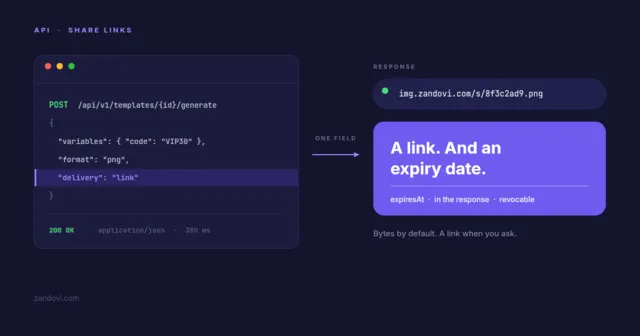
POST to /api/v1/templates/{id}/generate with a JSON body containing variables and options (format, outputDpi, quality). The response streams the rendered image binary, or a base64-encoded JSON payload if you prefer.
Is the API rate-limited?
Yes. Limits are enforced per-organization using Redis-backed distributed rate limiting. Paid plans have higher quotas.
Where can I find SDK code samples?
The API is a plain REST endpoint — you can call it with curl, fetch, requests, or any HTTP client. cURL examples are in the developer section of this page.
Templates & projects Saving, organising and sharing your work.
3 items
How many templates ship with Zandovi?
200+ templates across 18 categories: gift cards, coupons, certificates, business cards, tickets, social-media posts, birthday cards and more. Edit any of them, save your own variants, and share them with your team.
Can I have multiple templates in one project?
Yes. Projects group related templates with tabbed navigation, thumbnail previews, drag-to-reorder, and per-template visibility (private or shared).
Can I copy a template to another project?
Yes. Templates can be copied between projects, and entire projects can be cloned with all of their templates duplicated.
QR codes & barcodes Scannable codes baked into your designs.
3 items
What QR code options are supported?
QR codes have configurable error-correction levels, custom colours, an optional logo overlay, and configurable margin. Bind them to a variable for dynamic content.
Which barcode formats are supported?
CODE128, EAN-13, UPC, CODE39 and ITF-14. Each can be bound to a variable for dynamic values.
Can codes be different per row in a batch?
Yes — that is the main use case. Bind the code to a variable and every rendered output gets its own scannable code derived from the CSV row.
Teams & organizations Working with teammates and managing access.
5 items
How do teams work?
On sign-up, each user gets a personal organization automatically. You can create additional team organizations, invite teammates by email, and switch between organizations from the workspace picker.
What member roles are available?
OWNER (full control + billing), ADMIN (manage members + templates), and MEMBER (use templates, contribute designs).
Can I transfer ownership of an organization?
Yes. Ownership can be transferred to another OWNER or ADMIN, and members can be removed at any time.
Is single sign-on (SSO) supported?
SSO is planned for the Enterprise plan.
How are invitations handled?
Invitations are emailed with a token that has a configurable expiry. Pending invitations can be listed, resent or revoked.
Use cases Things real teams are using Zandovi for.
12 items
Personalized social-media graphics for marketing campaigns
Marketing teams upload a CSV of customer names, segment tags and offer codes, bind them to a brand-locked template, and generate up to 400 personalized social posts in one job. Each post is on-brand because the template is locked — only the variable values change. Outputs feed straight into the scheduling tool of choice.
Bulk event badges with attendee QR codes
Event organisers upload an attendee CSV with name, company, ticket type and a unique attendee ID. The template binds the name and company to text variables and the QR code to the attendee ID. Zandovi renders up to 400 badges in a single ZIP, ready for the print shop.
Course completion certificates at scale
Education platforms generate course-completion certificates by feeding student name, course title, completion date and a verification URL into a certificate template. Output is a print-ready PDF per student at 300 DPI with embedded fonts.
Gift cards and coupons for retail
Retail brands design one gift card template, then issue up to 400 unique cards with personalized recipient names, gift amounts and unique barcode codes — generated from a CSV and emailed to recipients in a single batch.
Dynamic menu cards for restaurants
Restaurants build a single menu-card template (dish name, ingredients, price, restaurant name), then re-generate the whole menu whenever prices change. One CSV update reprints the entire menu without touching the design.
Personalized email graphics from a backend
Developers call the public API from their backend to render a personalized hero image for every transactional email — including the recipient name, order number, and a QR code linking to the order receipt. Each render is under a second at 1080p.
Localized social posts for multiple regions
Global marketing teams maintain one template per format, and render localized variants — translated copy, regional currency, locale-specific imagery — by switching out variables per market. One source design, dozens of localized outputs.
Conference tickets with scannable barcodes
Conferences generate uniquely numbered tickets — each with a CODE128 barcode tied to a ticket ID — and email them as PDF attachments straight from their booking system via the Zandovi API.
Real-estate listing flyers
Real-estate agencies bind listing photo, price, address, agent name and a QR code linking to the full listing into a flyer template. New listings produce a new printable flyer in seconds with no manual design work.
Open Graph images for blog posts
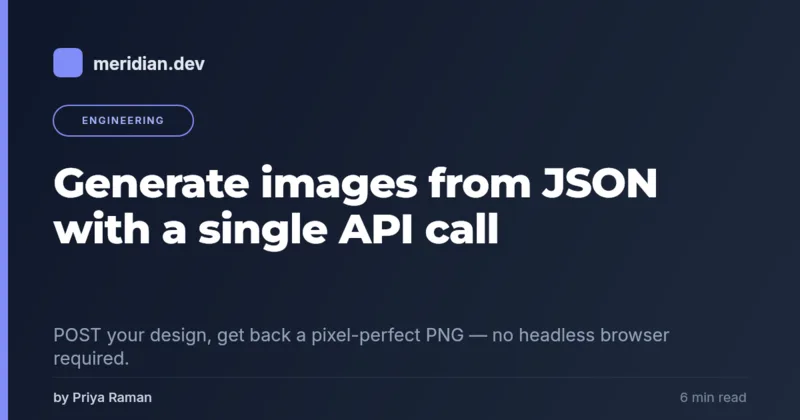
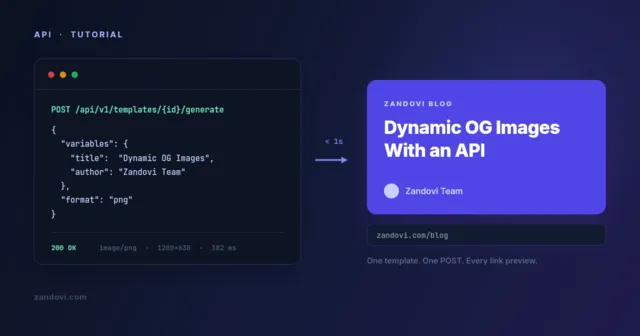
Blogs generate per-post OG images automatically: the post title, author and tag are bound to variables, and the build pipeline calls the API to render a unique 1200×630 image for every article URL.
Membership cards for clubs and gyms
Clubs design a membership card with member name, photo, tier and a QR code tied to the member ID. A nightly batch keeps every card collection up to date.
Birthday and anniversary cards for CRM workflows
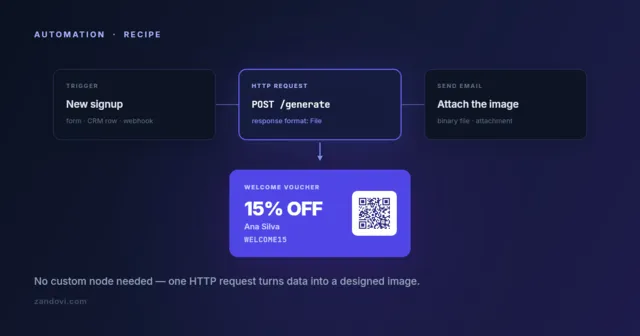
CRM platforms call the API on a customer's birthday or anniversary to render a personalized greeting image, attach it to the outgoing email, and ship it — fully automated.
Ready to design

Design once. Generate thousands.

The next 400 badges, 300 gift cards or 200 certificates are one CSV away. Start with a template, make it yours — and never assemble a design by hand again.

Private beta