What a Rendered Image Actually Costs: Image Generation API Pricing in 2026
- 12 Aug, 2026
We build one of the products in this category, so read this with that in mind. What follows is the comparison we had to do for ourselves, written down. Every number is from the vendor’s own public pricing page, checked in July 2026, and linked so you can verify it. Linked also so you can catch it when it goes stale, because these pages change every few months.
Why these pricing pages are hard to compare
Five things make a straight comparison awkward, and only some of them are accidental.
Credits are not renders. Some vendors charge one credit per image and some charge multiples for certain outputs. A PDF might cost two credits per page. A video costs by duration. If your workload is mostly PDFs, a plan advertising 5,000 credits might deliver 2,500 documents.
Annual prices are shown as if they were monthly. The large number on the page is often the annual-billing rate divided by twelve. Paying month to month costs meaningfully more, commonly 15-25%. Check which toggle is selected before you write the number down.
Some vendors meter per seat. A plan at $45 per seat with 450 credits per seat looks cheap next to a $149 flat plan until you have four people, at which point it isn’t.
Free tiers range from generous to decorative. “Free” sometimes means a recurring monthly allowance and sometimes means a one-time bundle of trial credits that never refills. Those are very different things when you’re evaluating.
What counts as a render varies. On most platforms, exporting an image by hand from the web editor consumes the same credit an API call would. On a few, it doesn’t. If your team does a lot of manual design work alongside the automated pipeline, this is the difference that dominates the bill.
The number to compare
Ignore the plan names. Compute cost per 1,000 renders at the tier you’d actually be on. Not the cheapest tier, and not the enterprise one, but the one that covers your realistic monthly volume with maybe 30% headroom.
Then check whether your specific output type carries a multiplier.
Entry tiers, July 2026
Prices as listed on each vendor’s public pricing page in July 2026. Where a vendor shows annual pricing by default, the monthly rate is noted.
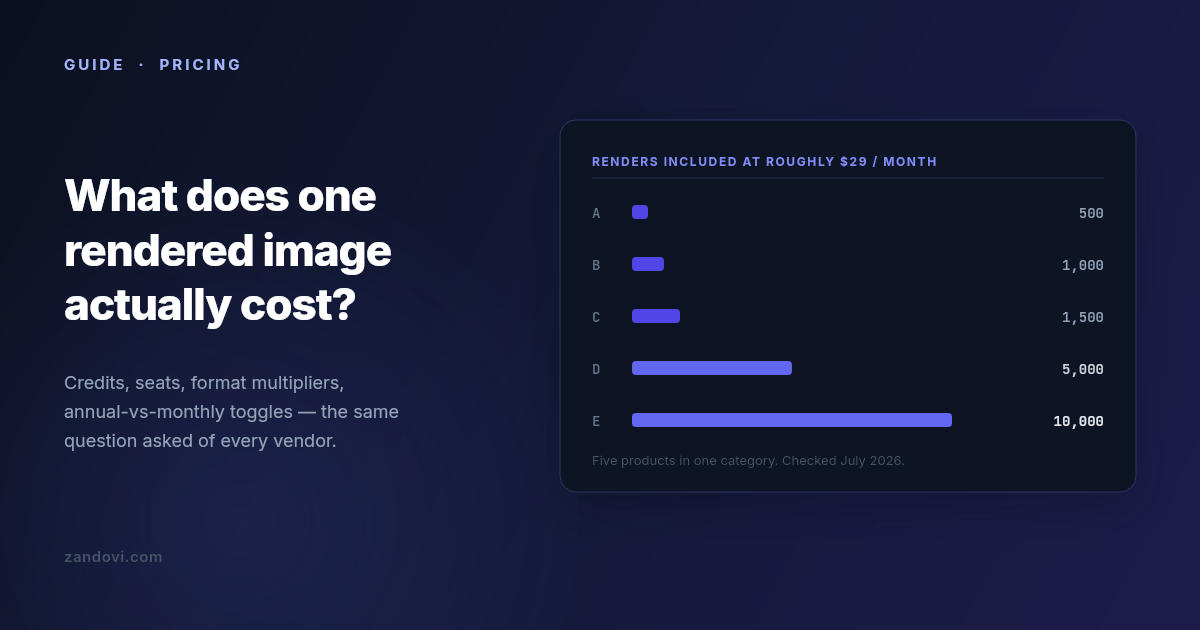
| Product | Entry plan | Renders included | ≈ Cost / 1,000 | Free tier |
|---|---|---|---|---|
| Placid | $19/mo | 500 credits | ~$38 | Trial credits |
| Bannerbear | $49/mo | 1,000 credits | ~$49 | 30-credit trial |
| Templated | $29/mo | 1,000 credits | ~$29 | One-time 50 credits |
| APITemplate.io | $29/mo billed annually ($35 monthly) | 1,500 renders | ~$19-23 | 50/mo |
| Zandovi | $29/mo | 5,000 renders | ~$5.80 | 100/mo |
And the higher tiers, where the per-render economics usually improve:
| Product | Mid tier | Renders | ≈ Cost / 1,000 |
|---|---|---|---|
| Placid | $39/mo | 2,500 | ~$16 |
| APITemplate.io | $69/mo | 9,000 | ~$7.70 |
| Bannerbear | $149/mo | 10,000 | ~$15 |
| Zandovi | $79/mo | 25,000 | ~$3.20 |
The part most comparisons leave out
If you stop reading at the table above, you’ll conclude that the established vendors are expensive and everything else is cheap. That’s not quite the shape of the market in 2026, because there’s a whole second group of products that compete purely on render economics.
As of July 2026, that group includes Imejis (around $24.99 for 10,000 renders, with 100 free per month), Bannerify ($29 for 10,000, also with a recurring free tier), RenderForm (from about $9 for 250, with credit rollover), HTML/CSS to Image (around $14 for 1,000) and Switchboard (around $19 for 1,000).
Look at those numbers next to the table and the honest conclusion is that on price per render alone, the budget group wins, and nobody in the established group beats them. That includes us. Bannerify sells 10,000 renders for the same $29 that buys 5,000 from Zandovi.
We’re saying this out loud because it’s the thing you’d find in twenty minutes anyway, and because it points at the actual question. If cost per render were the only variable, this would be a one-line market and the cheapest vendor would have all of it. It isn’t, so the useful question is what you give up at each price.
What you’re actually buying at each price point
The budget group is typically API-first. You give it HTML/CSS or a simple template definition and it gives you an image, fast and cheap. What’s usually thin or absent: a real visual editor a non-engineer can use, batch processing from a spreadsheet, print-ready output at a controlled DPI, team accounts with roles, and template management beyond a list. If your rendering need is well-defined, high-volume, and owned entirely by engineers, this group is very hard to argue against.
The established group charges more per render and sells operational maturity: years of uptime history, mature integration ecosystems, video and GIF generation in Bannerbear’s case, support you can escalate to. If you’re integrating rendering into a product your customers depend on, that history is worth paying for and the per-render delta is probably noise in your budget.
Seat-metered products like Abyssale price around teams rather than volume. If your usage is five designers each making a moderate number of assets, that model can work out cheaper than volume pricing. If it’s one server making 100,000 calls, it won’t.
Five questions that change the answer more than the headline price
Does your output type carry a multiplier? If you generate PDFs, ask specifically. One credit per page versus two per page doubles your bill and appears nowhere in the headline number.
What happens at the limit? Most of this category hard-stops when you exhaust your quota, and requests start failing until the reset. A few sell overage credits instead. Neither is wrong, but they fail differently. A hard stop means a broken feature and an upgrade decision at 2am, while overage means a surprise on the invoice. Know which one you’ve bought.
Do editor exports count? If your team designs in the web editor and exports by hand, check whether those exports draw from the same pool as your API calls. On most platforms they do.
Is the free tier recurring? A monthly allowance lets you build, test in CI, and run a small side project indefinitely. A one-time trial bundle lets you evaluate for an afternoon. Both are legitimate; only one is useful to develop against.
How many templates can you have? Template caps exist on some entry plans and are a recurring complaint in reviews of this category. If you’re generating across a dozen designs, a three-template cap ends the evaluation regardless of render price.
A rough decision guide
If you need images inside a product, at volume, and engineers own the whole pipeline, start with the budget group. The economics are genuinely better and the missing features are ones you may not need.
If you need a track record, integrations that already exist, or video, Bannerbear and Placid are the incumbents for a reason. Pay the premium and stop thinking about it.
If non-engineers need to own the designs, you need a real editor, and the field narrows sharply. Most cheap renderers are code-first by design.
And if your workload is bursty and human-driven, a few hundred certificates after an event or a set of vouchers per campaign rather than steady API traffic, look for spreadsheet batch processing and check what a manual export costs you.
Where we fit, stated plainly
Zandovi is $29/month for 5,000 renders, with 100 free per month on a recurring basis. Against the category leaders that’s several times more renders per dollar. Against the budget flank it isn’t the cheapest, and we’re not going to pretend otherwise.
What we’re actually built around is the combination: a full visual canvas editor where any text, image, QR code or barcode can be a variable; spreadsheet batch generation that outputs a ZIP; print-ready PDF at 300 DPI with no format multiplier; and unlimited manual editor exports on every paid plan, because metering someone’s design work by the click never made sense to us. If you need none of that, buy renders from whoever sells them cheapest. That’s a real answer, and for a lot of workloads it’s the right one.
Verify before you commit
Every number here has a date on it and a link next to it, and that’s deliberate. This category re-prices constantly: over the twelve months to July 2026 at least three of the products named above restructured their plans. Before you sign up for anything, open the linked pricing page and confirm the number yourself, paying attention to the annual/monthly toggle.
And build a small proof of concept on the free tier before you commit to a year. Cost per render is easy to compare on a spreadsheet and rarely the thing that decides whether a tool works for you.
Sources: Bannerbear pricing, Placid pricing, APITemplate.io pricing, Templated pricing, Zandovi pricing. All figures checked July 2026.