Your Render Came Back as a URL. How Long Does It Last?
- 21 Aug, 2026
You POST a JSON payload to an image API. A second later you get back something like this:
{ "image_url": "https://cdn.example.com/renders/8f3c2ad9.png" }That’s convenient. It’s also the end of what most vendors will tell you. The image is now sitting on somebody else’s storage, behind somebody else’s CDN, under a retention policy you have probably not read, and you are about to paste that URL into an email that goes to fifty thousand people.
We build one of the products in this category, so read this with that in mind. What follows is a check we did on ourselves and then on everyone else, in August 2026, working from each vendor’s own API documentation.
First, the thing we got wrong
We had an internal note claiming hosted URLs were a premium feature in this category — something you unlock on a higher plan. We were about to publish that.
It isn’t true. Of ten vendors we checked, eight return a hosted URL as their default or only response format, and six of those offer it on a free or entry tier with no gate at all. If you’re using a rendering API today, you are almost certainly already getting a URL.
What is commonly gated to higher tiers is bring-your-own-storage — pointing the renderer at your own S3 bucket instead of theirs. Bannerbear puts it on Enterprise, APITemplate.io on Enterprise, Templated on Scale, Bannerify on Business, Switchboard on Agency. That’s a real pattern. It just isn’t the same thing as “hosted URLs are premium,” and we shouldn’t have conflated them.
So this post isn’t “here’s a feature nobody else has.” It’s the more useful version: here’s what to actually check about the URL you’re already getting.
Question 1: how long does it live?
This is the one that surprised us, and it’s the reason the post exists.
Retention policy is where the documentation in this category thins out fast. Some vendors state a policy clearly:
- APITemplate.io — one year on the free plan, indefinite on paid while your subscription is active.
- HTML/CSS to Image — kept as long as your account is active.
- RenderForm — 14 days on free and pay-as-you-go, persistent on Pro.
- Switchboard — a flat seven days, on every plan.
Others are vague or silent. Bannerbear’s duration wasn’t something we could pin down from the docs. Placid says images are kept for a limited time without committing to a number. Templated and Abyssale don’t appear to state it at all.
Note the spread: seven days at one vendor, indefinite at another. Both are defensible policies, and they imply completely different architectures on your side. If you assumed “indefinite” and you’re on the seven-day one, your emails develop broken images a week after send, and nothing in your monitoring will tell you.
(We keep a running comparison of this category’s pricing in What a Rendered Image Actually Costs — retention is the sort of thing that belongs on a pricing page and almost never is.)
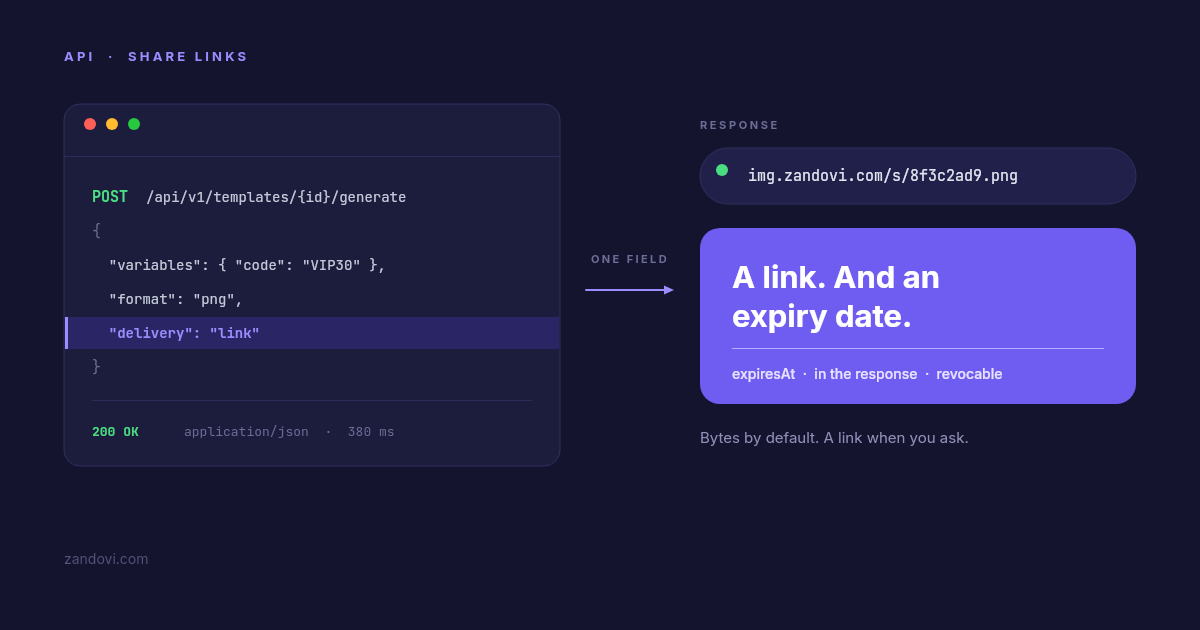
Zandovi expires links on a plan-based schedule — seven days on free, thirty on Personal, up to a hundred and eighty on Business — and the exact timestamp comes back in the response:
{
  "url": "https://img.zandovi.com/s/8f3c2ad9e1b74c05.png",
  "expiresAt": "2026-09-23T09:00:00Z"
}
We’ll be direct about the trade here: that’s shorter than several competitors. If you want an image to live indefinitely, APITemplate and HCTI will do that and we won’t. What we’ll do instead is tell you the exact moment it stops, in the response body, so you can store it next to whatever references the URL. Which of those you want depends entirely on the next question.
Question 2: is this image supposed to outlive the thing it’s about?
Most of the confusion here comes from treating “generated image” as one category. It’s two.
Images that should persist: an OG card referenced in a page’s <head>, a
product shot, an avatar, anything a crawler will come back for in two years.
These want permanent storage — either a vendor that keeps them indefinitely, or
your own bucket, which is what the bring-your-own-storage tier exists for. Don’t
build these on a link that expires. (This is exactly why
our OG-image walkthrough takes the bytes and
writes them to static assets rather than using a share link.)
Images tied to something that itself expires: a voucher graphic, an event badge, a proof you’re sending a client, a one-off share. These are the ones where indefinite retention is quietly a liability. A two-year-old link to a 30%-off graphic is still live, still screenshot-able, still being posted to deal forums, long after the offer died. Nobody ever schedules the cleanup.
For the second category, expiry isn’t a limitation you work around — it’s the behaviour you want. A voucher that stops being valid on 23 September and a voucher image that stops loading on 23 September are the same promise, kept consistently, without you writing a lifecycle rule.
Question 3: can you delete one?
Separate from expiry: if a single image needs to come down now — wrong price, wrong name, customer asked — is there an endpoint for that?
Fewer vendors document this than you’d expect. Placid has a documented
DELETE /api/rest/images/{id}. Templated has DELETE /v1/render/{id}. For
several others we couldn’t find one in the API reference at all, which doesn’t
prove it’s absent, but does mean you’d be opening a support ticket rather than
making a call.
Zandovi’s is DELETE /api/v1/shares/{shareId}, on every plan, and it hard-deletes
the object rather than hiding it. There’s also a Shared Links tab in the
editor for people who’d rather click a button, where workspace owners and admins
can see and revoke every link in the organization — which matters mostly for the
case where someone leaves and their links keep resolving.
One honest caveat: shared images are cached at the edge for up to five minutes. Revoking purges that cache, but treat it as “stops being available shortly,” not “vanishes this instant.”
The bonus question: can you still get the bytes?
Here’s the one place our answer genuinely differs from most of the field, and it’s the opposite of what we originally assumed.
Most vendors in this category return a URL and nothing else. Bannerbear,
Placid, Templated, Abyssale, RenderForm, HTML/CSS to Image and Switchboard all
answer with a hosted link; if you want the file itself you fetch that link in a
second round trip. A few offer both — APITemplate has an opt-in file export,
Bannerify has separate endpoints, Orshot lets you pick url, base64 or
binary.
Zandovi is in that smaller group, with bytes as the default:
# bytes — the default, unchanged since we launched
curl -X POST https://app.zandovi.com/api/v1/templates/$TEMPLATE_ID/generate \
  -H "X-Api-Key: $ZANDOVI_API_KEY" \
  -H "Content-Type: application/json" \
  -o voucher.png \
  -d '{ "variables": { "first_name": "Sarah", "code": "VIP30" }, "format": "png" }'
# a hosted link — add one field
curl -X POST https://app.zandovi.com/api/v1/templates/$TEMPLATE_ID/generate \
-H "X-Api-Key: $ZANDOVI_API_KEY" \
-H "Content-Type: application/json" \
-d '{ "variables": { "first_name": "Sarah", "code": "VIP30" },
"format": "png", "delivery": "link" }'Same render, same single charge against your quota. delivery picks how the
result comes back, not what it costs.
Having both matters more than it sounds. Writing the file to your own storage is a one-step operation when the render hands you bytes, and a fetch-then-write when it hands you a URL. Conversely, putting an image in an email is trivial with a URL and a hosting project with bytes. Most workflows want one or the other, and which one flips depending on the job — sometimes within the same codebase.
It also decides how much friction you hit in a no-code tool. Binary responses are the single most common thing people get wrong when calling an image API from n8n, Make or Zapier — leave the response format on JSON and you get an unhelpful parse error. We wrote up the HTTP-node recipe for those platforms, and asking for a link is the shortcut that skips the whole binary-handling problem.
Why the URL matters at all: email
If you’re wondering why anyone cares about the delivery format, transactional email is the sharpest case.
Email clients are hostile to every approach except one. Inline data: URIs get
stripped by Outlook and ignored by much of the rest. Attaching the image works
technically, but it inflates the message and a promotional graphic as an
attachment is a good way to get filed somewhere nobody looks. Gmail clips
messages over roughly 102 KB, and a clipped message hides your call to action
behind a “View entire message” link.
What works is boring and has worked for twenty years:
<img src="https://img.zandovi.com/s/8f3c2ad9e1b74c05.png"
     alt="Your £30 voucher" width="600">
Which makes the whole flow one function:
async function voucherEmail(order) {
  const res = await fetch(
    `https://app.zandovi.com/api/v1/templates/${TEMPLATE_ID}/generate`,
    {
      method: 'POST',
      headers: {
        'X-Api-Key': process.env.ZANDOVI_API_KEY,
        'Content-Type': 'application/json',
      },
      body: JSON.stringify({
        variables: {
          first_name: order.firstName,
          code: order.voucherCode,
          expires_at: order.expiresAt,
        },
        format: 'png',
        delivery: 'link',
      }),
    },
  )

  if (!res.ok) throw new Error(`render failed: ${res.status}`)
  const share = await res.json()

  return mailer.send({
    to: order.email,
    subject: 'Your voucher is inside',
    html: `<img src="${share.url}" alt="Your voucher" width="600">`,
  })
}
Store share.expiresAt next to the order. When someone asks for a resend after
it lapses, re-render rather than digging for a dead link.
If you’re rolling your own renderer
Everything above assumes you’re using a hosted API. If you’re generating images
yourself — Satori/@vercel/og, Puppeteer, sharp, node-canvas — then you’re in a
different position: you get bytes, always, and the entire hosting question is
yours.
That’s the case where “just put it in a bucket” turns into a bucket, a public-access policy, a CDN, a key-naming scheme that doesn’t let one customer guess another’s filenames, an expiry policy, something that actually enforces it, and an admin path for taking one image down. It’s a real afternoon, and then it’s a permanent thing you operate. Worth knowing that’s the trade before you start, because it’s usually invisible in the “generate an OG image in 10 lines” tutorials.
What share links are not
Three limitations, stated plainly, because finding them out later is worse.
Not permanent. Seven to a hundred and eighty days by plan, then the object is deleted rather
than archived. For anything that must persist, use delivery: "binary" and your
own storage.
Not private. Anyone holding the URL can open it — no password, no per-viewer expiry, no referrer check. The token is 256 bits of randomness with no relationship to your template or account, so nobody enumerates them, but unguessable is not the same as secret. Think twice before rendering someone’s full name next to their order details into a link you email.
Not a CDN you control. Five-minute edge cache, one purge on revoke, fixed response headers.
The short version
Whatever you’re using, three things are worth checking today:
- How long does the URL live? If the docs don’t say, ask support and write the answer down. The range across this category is seven days to indefinite.
- Can you delete one on demand? Look for a documented DELETE endpoint.
- Can you get the raw bytes when you need them? Most vendors say no.
For Zandovi the answers are: a plan-based window returned in every response, yes
via DELETE /api/v1/shares/{shareId}, and yes — bytes are still the default.
Vendor behaviour above was checked against each vendor’s own API documentation and pricing pages in August 2026. These change often — verify before you commit to anything on the strength of a blog post, including this one.