Certificate Maker Software: 2026 Buyer's Guide
- 28 Aug, 2026

You’re choosing certificate maker software because the spreadsheet is already waiting, the cohort is already done, and the cleanup window is already shrinking. If the tool can’t validate data before render, can’t produce a print-ready PDF, and can’t give each certificate a verifiable ID, it’s not a certificate workflow. It’s a future support ticket.
Table of Contents
- What to Look for Before You Pick a Tool
- How Certificate Maker Software Renders at Scale
- The Five Fields a Certificate Template Binds
- Validation That Runs Before Anything Renders
- A Realistic 230-Row Batch From Spreadsheet to ZIP
- Turning a Certificate Into a Checkable Credential
- Decision Checklist and First-Batch Path
What to Look for Before You Pick a Tool
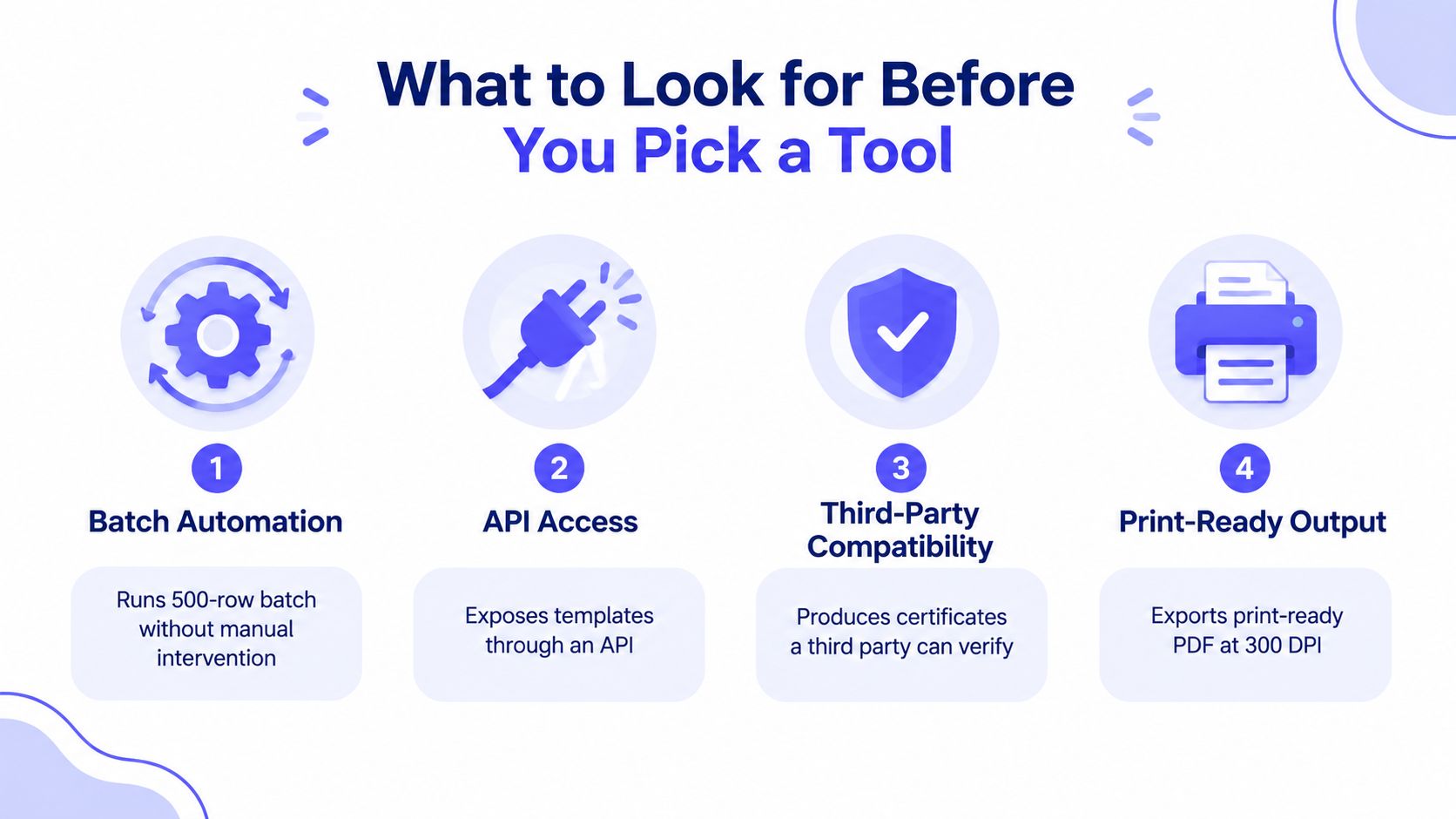
Start with the contract, not the canvas. The key question is whether the software can take a spreadsheet, map fields cleanly, render a print-ready PDF at 300 DPI, and leave you with certificates a third party can verify later. The market is already big enough to show this isn’t a novelty, with digital certificate management software estimated at USD 907.3 million in 2025 and projected to reach USD 2.1 billion by 2035 in one industry estimate, while a broader certificate management tool market is put at USD 3.221 billion in 2024 and USD 5.502 billion by 2034 in another, with North America at 40% and Asia Pacific at 30% industry estimate. That scale tells course teams, HR leads, and event operators the same thing, buyers want systems that can issue at volume without breaking layout or governance.
Audit the workflow before the design
A serious evaluator should ask four blunt questions. First, does it run a bulk batch from a spreadsheet without manual intervention. Second, does it expose templates through an API or at least a clean import path. Third, can a non-designer maintain the template without rebuilding it from scratch every quarter. Fourth, can each certificate carry a unique ID that a verifier can check later.
Practical rule: treat the spreadsheet as the contract. If the software can’t tell you which columns are required, which are optional, and which blanks fail loudly, the first batch will be your test run whether you want one or not.
That matters because certificate issuance is now a high-volume software problem, not a hand-editing task. Internet certificate workflows reached massive scale long ago, with public SSL/TLS certificate issuance reported at 10,940,896,117 certificates in Q1 2026, roughly 1,407 certificates per second, and CT logs at 13.75 billion certificates in Q2 2026, up 33% from 10.33 billion in Q2 2025 transparency-log analysis. Branded certificates are a different use case, but the operating lesson is the same, automation wins only when the data contract is strict.
Score the tool against failure, not beauty
The fastest way to choose badly is to judge template polish before validation and verification. A decent tool separates stable layout from variable data, catches malformed rows before rendering, and produces files that print cleanly without a browser in the middle of the pipeline. If the vendor can’t show how it handles spreadsheet rows, row-level errors, and verification IDs, the design editor is decorative noise.
For course creators and HR teams, that usually means one more test, the batch has to survive a boring roster. If the roster comes from an LMS export, a payroll file, or a session spreadsheet, the tool should absorb it with the same rules every time. Anything less turns one clean Friday upload into a Monday cleanup job.
How Certificate Maker Software Renders at Scale
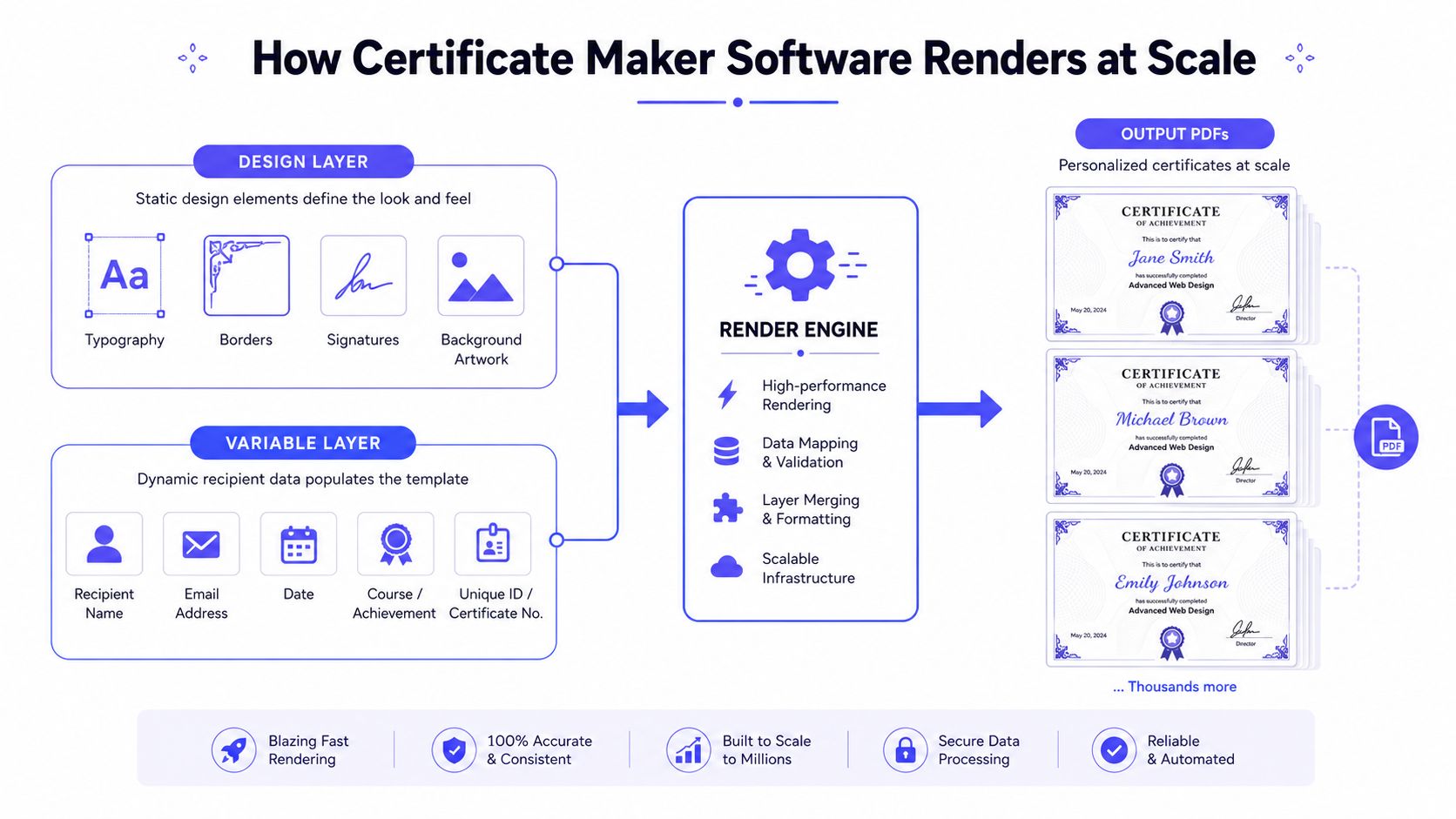
The right architecture is simple to describe and easy to get wrong. The design lives in one layer, typography, borders, seals, and background art, while the recipient data lives in another layer, names, dates, course titles, and certificate IDs. That separation is why batch issuance works at all, the template stays fixed and the rows change bulk certificate generator workflow.
Stable design, variable data
A workable engine compiles the template once, then walks the data row by row. Each row binds to named fields, renders a PDF, writes the file, and moves on, which is why one template can produce five certificates or five thousand without redrawing the layout. That is also why file-by-file manual editing falls apart once the roster grows, every certificate becomes a separate error surface.
The better systems don’t just merge text. They validate variable length, detect malformed rows, and guard against visual breakage before the renderer starts. Long names, odd character sets, and mismatched columns are not edge cases, they’re normal batch inputs.
Why server-side rendering matters
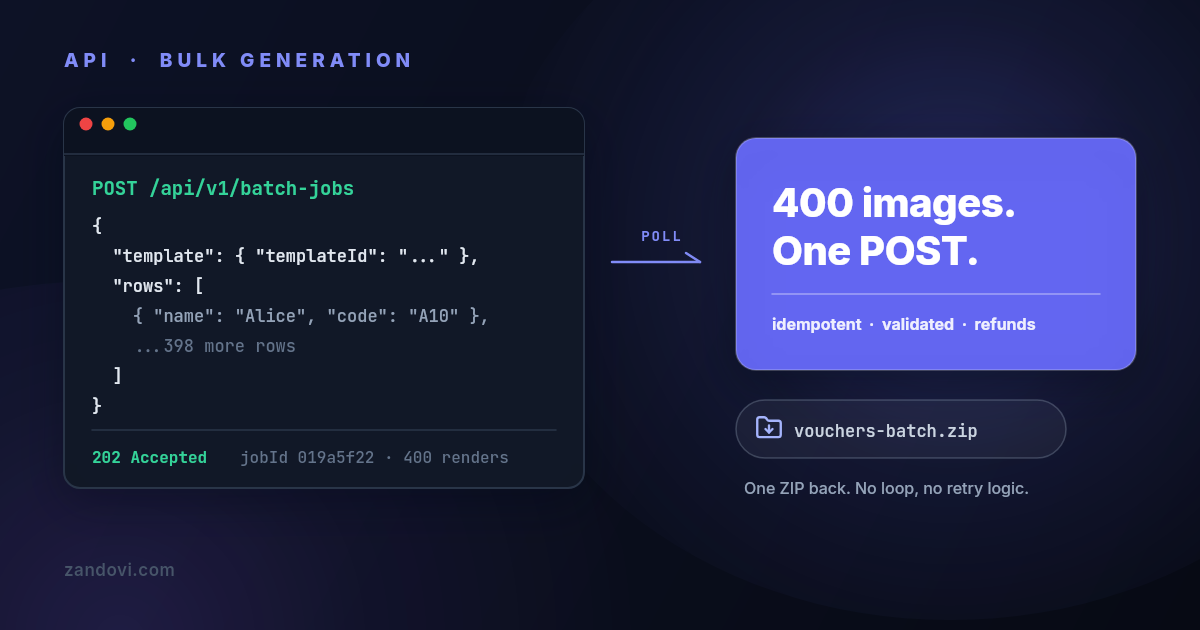
At scale, batch systems should use queues and workers, not a synchronous loop that blocks the user interface. The operating pattern is clear, the user uploads or posts the roster, jobs enter a queue, workers render PDFs, upload outputs, notify recipients, and mark completion when done technical guidance on batch rendering. That’s the difference between a tool that feels instant for one certificate and a tool that survives a cohort.
If a vendor says batch is “just like single export, but repeated,” assume it hasn’t been stressed properly.
Server-side rendering also keeps output consistent. A deterministic renderer gives the same pixels every time, which matters for certificates, where the layout is part of the credential, not a suggestion. If the system depends on browser rendering, font drift and environment drift sneak in, then someone notices after the PDFs have already gone out.
The Five Fields a Certificate Template Binds
The cleanest certificate workflows keep the template simple and the spreadsheet tighter. The starter template binds exactly five fields, recipient_name, course_name, completion_date, signer_name, and certificate_id. In most real batches, only recipient_name and certificate_id vary per row, which is the whole point of separating cohort defaults from per-person data.
| Field | Typical binding | Default across cohort? | Validation risk |
|---|---|---|---|
| recipient_name | Per recipient | No | Spelling, accents, long values |
| course_name | Per cohort | Yes | Wrong title, inconsistent naming |
| completion_date | Per cohort | Yes | Date format mismatch |
| signer_name | Per cohort | Yes | Signature line drift |
| certificate_id | Per recipient | No | Duplicate or missing ID |
Keep the spreadsheet small
The best practice is not to stuff every repeated value into the CSV. A two-column roster is harder to break than a five-column roster, and every column removed is one fewer place to misspell something. If the course title, date, and signatory are fixed for the whole cohort, the template should hold them as defaults and the sheet should only carry the true variables.
That design choice also limits validation noise. You’re left checking the fields that change, instead of cleaning up a hundred rows of identical data. The result is a roster that reads like a contract, not a database export.
Treat the ID as the credential
The certificate ID deserves more attention than the course title. It’s the field that makes the document queryable later, and it’s the field that should stay unique per recipient. The printed name can be human-readable, but the ID should be the machine-traceable anchor that a verifier can look up.
A signature graphic belongs in the design layer, while the printed signer name is just another text variable. That distinction matters, because teams often confuse the visual mark of authority with the actual validation mechanism. The signature makes the certificate look complete, the ID makes it checkable.
Validation That Runs Before Anything Renders
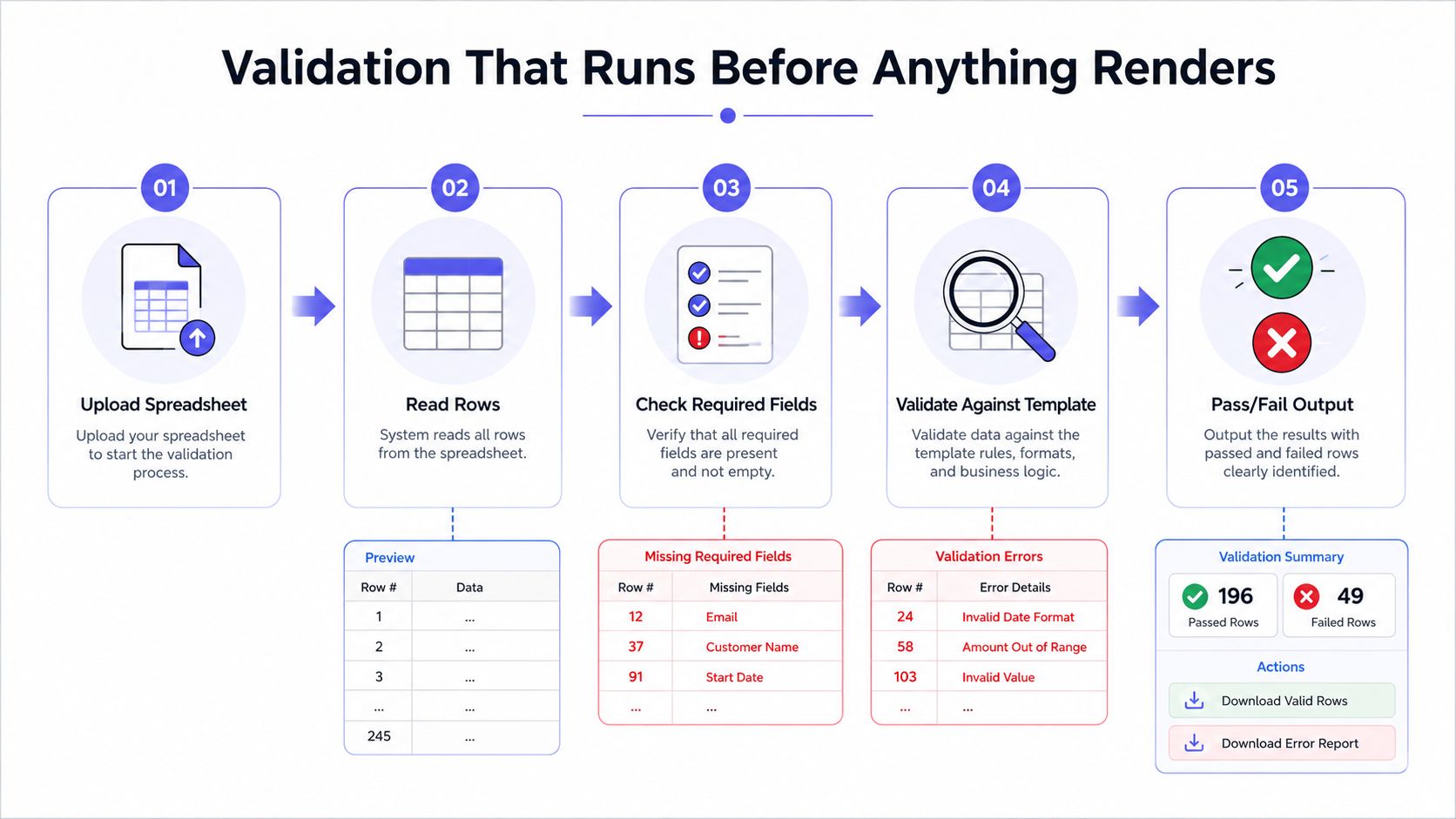
A reliable system stops bad input before it wastes time. The pipeline should read each row, compare it against the template schema, and show a row-level error report before a single PDF is produced. In the stronger implementations, variables can be marked required, given allowed-values lists, and constrained with length or pattern rules, so the software catches bad data where it starts instead of after export.
What good validation actually looks like
A decent upload screen doesn’t just say failed. It should tell the operator something like “3 errors in 230 rows”, name the row and column, and send the correction back to the spreadsheet instead of forcing a UI hunt. That’s the difference between a five-minute fix and a lost afternoon. The better systems also validate long names before render so the operator learns that one value is far outside the normal range before it prints too small to read.
The input contract should be explicit enough that a non-technical operator can work without guessing. If a course title must match one of three allowed values, that rule belongs in the template. If a certificate ID must follow a pattern, that belongs there too.
Why pre-billing checks matter
Billing should happen after the data clears, not before. If the batch is rejected at validation, it shouldn’t be billed, and if a render fails, that failure should be refunded. That policy keeps cleanup from becoming a financial penalty, which is exactly where cheap tools get expensive.
Catching three bad rows costs minutes. Catching them after 230 certificates have been rendered, printed, and mailed costs far more than time.
Template validation and operations meet here. The operator needs a clear pass or fail state, the job queue needs failure isolation, and the corrected rows should be the only ones that need reruns. Anything else makes batch work feel fragile even when the PDF output looks polished.
A Realistic 230-Row Batch From Spreadsheet to ZIP
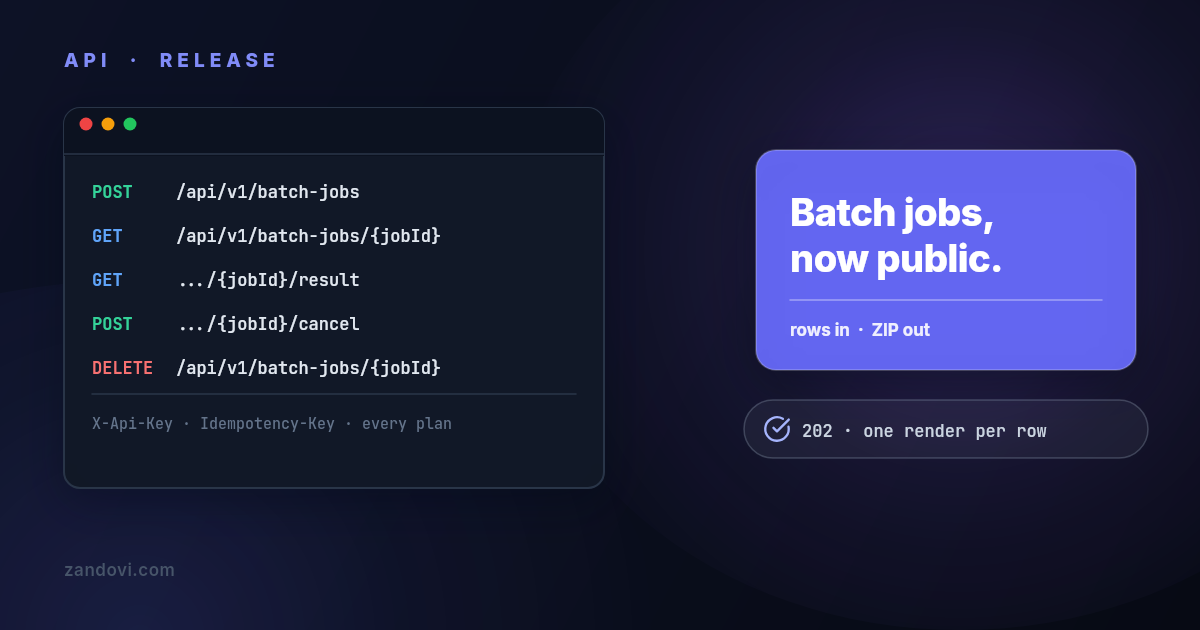
A finished cohort hits the practical test the minute the roster leaves the LMS or HR export and lands in the certificate tool. A decent upload screen should report the bad rows by number, name the field that failed, and send the correction back to the spreadsheet. In this batch, a course ends on Friday with 230 attendees, the lead uploads the file, validation catches three bad rows, the sheet gets fixed, and the final job returns as a ZIP with one print-ready PDF per learner. The process can run from the browser, from an API request, or through the template browser at Zandovi certificate templates, but the logic stays the same.
What good validation looks like
The validator should show exactly what is wrong before anything renders. In a batch like this, the failures are usually plain, a blank name, a duplicate identifier, or a value outside the allowed list. Plain is good, because plain errors are easy to fix in the spreadsheet without touching the layout.
| Stage | Input | Result | Action |
|---|---|---|---|
| Upload | 230-row spreadsheet | Validation starts | Read headers and variables |
| Check | Row 47, row 112, row 198 | 3 errors found | Fix source data |
| Re-upload | Corrected spreadsheet | All rows pass | Queue batch render |
| Render | 230 valid rows | One PDF per learner | Build ZIP archive |
| Deliver | ZIP and manifest | Complete batch | Store or share outputs |
The important part is timing. The bad rows should be rejected before billing, before render, and before anyone starts cleaning up a mess that should have been blocked at upload.
Why the example scales cleanly
The point of the batch is repeatability, not just speed. Each output file should be named from the data so the ZIP matches the roster line for line, and the manifest should carry the certificate IDs and verification URLs. That gives ops teams an audit trail when a learner asks for a reissue months later.
For the Team plan, 230 rows can stay in one job, while lower tiers force the same roster into smaller chunks. That is a planning issue, not a design flaw, and it is why the spreadsheet should be structured before the first upload. If the roster is messy, the render queue will be messy too.
Turning a Certificate Into a Checkable Credential
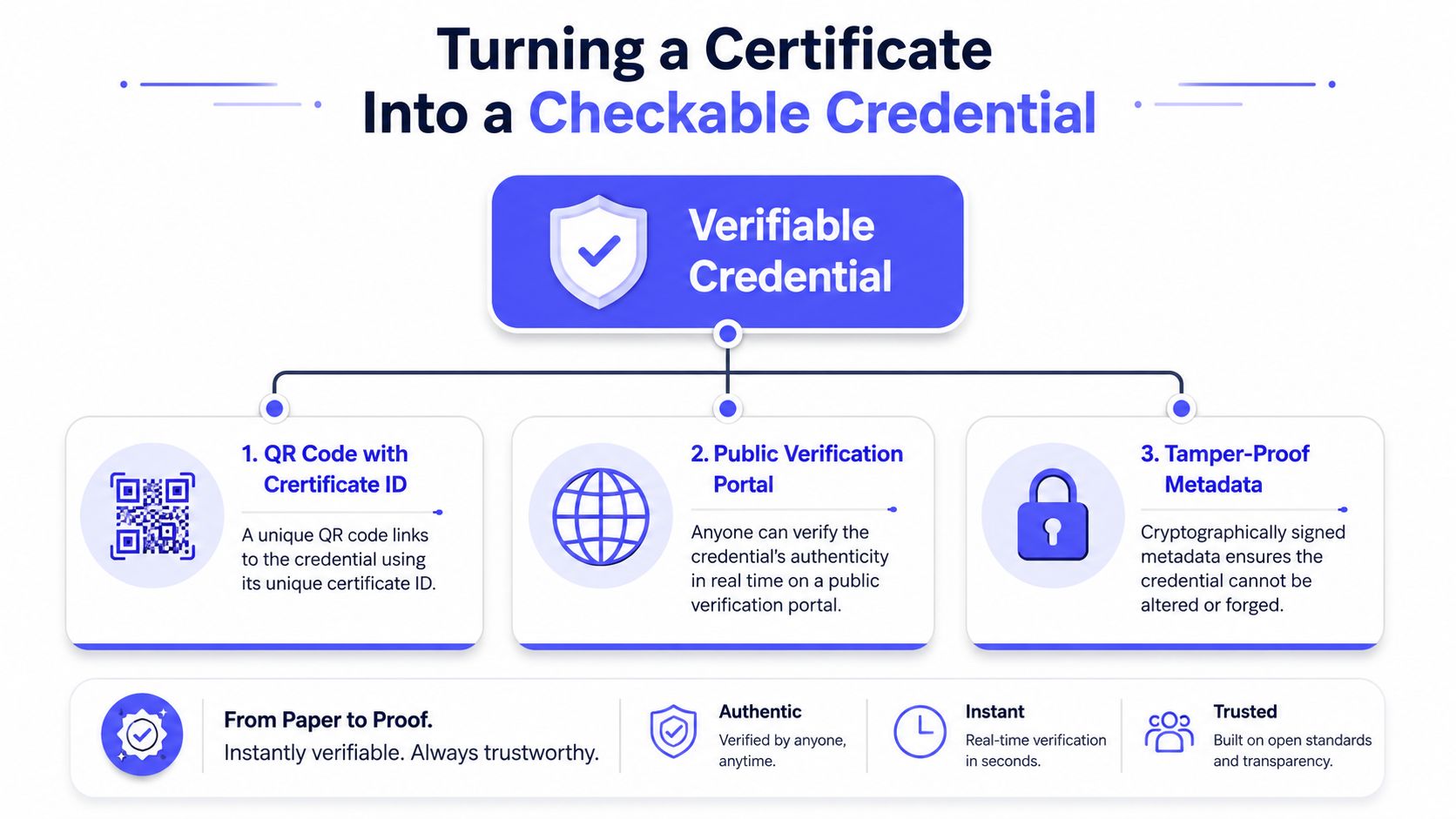
A decorative PDF stops being enough the moment someone else has to trust it. The strongest certificate maker software turns the file into a checkable credential with a unique ID, a public verification path, and a QR code bound to that ID. That combination gives employers, regulators, and recipients a way to authenticate the document without emailing the issuer for confirmation verification and fraud concerns.
QR codes are not decoration
A QR code only matters if it resolves to a certificate ID that can be checked later. If it just points to a generic webpage, the code is branding, not verification. The better pattern is simple, generate a unique serial, store the record at render time, expose a public lookup page, and encode the URL into the certificate so the scan resolves to the right credential.
The credential should also carry the usual checklist items, recipient name, achievement description, issue date, issuer signature, and a serial or QR token PDF certificate creation checklist. Those fields make the artifact legible to humans and verifiable to machines.
Fraud prevention starts in workflow design
Fake certificates are easy to make with graphic software. That’s why verification can’t be an afterthought, or the design becomes a fraud-friendly PDF with a nice logo. The stronger vendors treat verification as part of the core product, not a secondary settings page.
A certificate without a verification path is a polished attachment, not a credential.
Operationally, the best test is blunt. If the certificate can be forwarded, printed, scanned, and checked later without contacting support, the workflow is doing its job. If it can’t, the design work was wasted on something decorative.
Decision Checklist and First-Batch Path
A buyer should shortlist tools by asking one question per failure mode. Can the software separate template data from row data. Can it export a print-ready PDF. Can a non-designer maintain the template. Can each certificate carry a unique verifiable ID. If the answer to any of those is vague, the tool is too soft for real issuance.
Compare certificate workflows in Zandovi vs Bannerbear
Use a scorecard that matches the work
The scorecard should reward data-binding fidelity, error-reporting depth, output resolution, and verification-page persistence. That keeps the review focused on the certificate operation itself instead of flashy editor features that won’t matter after the first cohort. If the vendor can’t show row-level validation or a stable lookup page, it doesn’t belong on the shortlist.
For teams choosing between a free tier and a paid tier, the right trigger is batch size and governance, not aesthetics. The free plan should be fine for small runs, but once the roster needs more rows, custom IDs, or team access, the paid tier becomes the operational default. Zandovi’s published plans are Free $0, Personal $29, Studio $49, Team $79, and Business $199, with batch caps and render limits rising across tiers, while the manual editor exports stay unlimited on paid plans and print-ready PDF stays available on every plan.
Start with a safe first batch
A clean first run should follow a simple path. Export the cohort to CSV, open one bundled template, map the fields, run a small dry render, fix the obvious data issues, and only then launch the full batch. That keeps the first live issuance inside one sitting rather than turning it into a design project.
A practical sequence looks like this:
- Export the roster carefully. Use the source spreadsheet as the truth and keep repeated values out of the CSV when the template can default them.
- Run a small test batch. A 10-row dry render is enough to catch kerning, long names, and date formatting mistakes.
- Fix the obvious issues. Misspellings, duplicates, and malformed IDs should be cleaned in the sheet, not inside the certificate editor.
- Commit the full batch. Turn on verification links, confirm the manifest, and archive the ZIP with the roster.
- Save the template. The next batch should be upload, validate, submit, not redesign.
The best first batch is boring in the right way. It proves the spreadsheet is the contract, the PDF is the artifact, and the verification link is the thing that keeps the certificate useful after the email gets buried.
If the current tool can’t validate rows before render, can’t give each certificate a verifiable ID, and can’t survive a cohort without manual cleanup, it’s costing time that doesn’t show up on the invoice. Pick the workflow that makes the spreadsheet the source of truth, run a dry batch, and switch the next cohort to a system that can issue, verify, and archive without a rescue session.