Showing Posts From
Csv
- 20 Aug, 2026
Canva Bulk Create: The Limits, and What to Do When You Hit Them
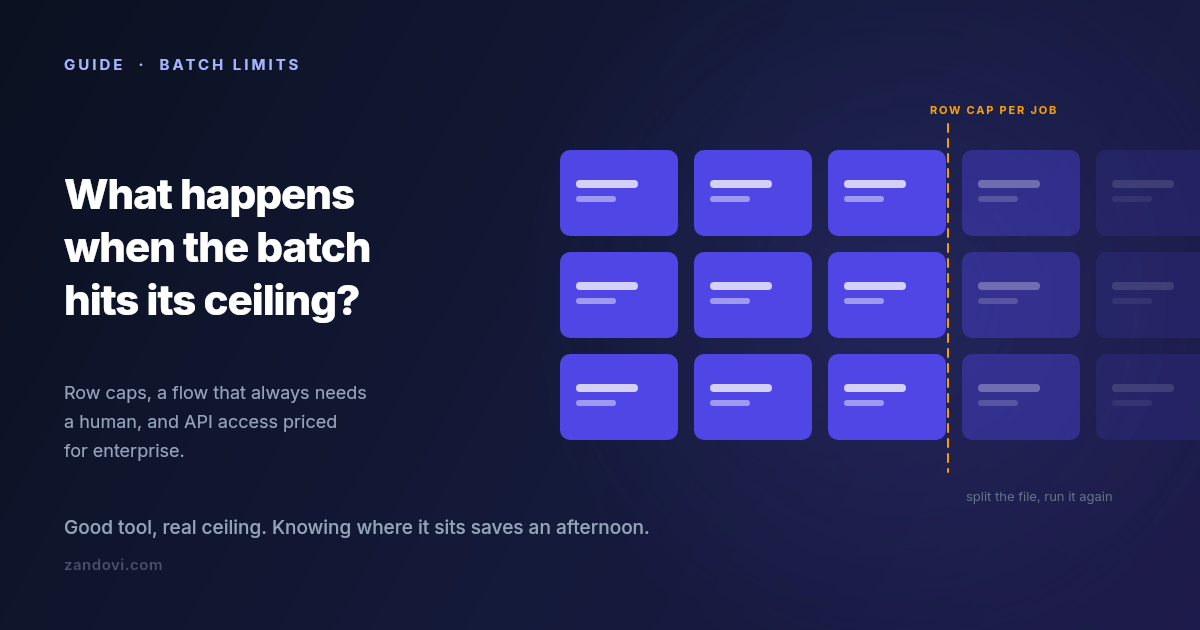
We make a tool that competes with part of what Canva does, so weigh this accordingly. It's also true that most people reading this should probably stay where they are, and this post says where that line is. Canva's Bulk Create is a good feature. You build a design, connect a spreadsheet, map columns to text and image placeholders, and get a personalized copy per row. For name badges, social variants and simple certificates, it is often the fastest path from data to output, and if it's working for you there's no reason to change anything. But there's a specific set of walls people hit, and hitting one tends to send you searching. Here's what they are. Wall 1: rows per batch Bulk Create caps how many rows you can process in one go. Canva's help center documents the current figure, which has been in the low hundreds, and the cap applies per batch, so a larger dataset means splitting the file and repeating the process. The documented cap is usually not the real limit anyway. Each row becomes a page in a single Canva document, so a few hundred rows produces a few hundred pages in one file, and the editor gets progressively heavier to work with. In practice most people find their comfortable batch size well below the technical maximum. Not because it stops working, but because reviewing and exporting a 300-page document is its own chore. If you're generating a few hundred items a few times a year, splitting the file is genuinely fine. If it's a recurring weekly job, the splitting is the problem. Wall 2: it's a human-in-the-editor flow This is the bigger one, and it's structural rather than a number you can raise. Bulk Create is something a person does: open the design, connect the data, map the fields, generate, review, export. There is no version of it that fires when a form is submitted, when an order completes, or when a row lands in a database. Someone has to be at the keyboard. That's fine for campaign work. You sit down, you make the batch, you're done. It doesn't work at all for anything continuous. If your certificates should be issued the moment a learner finishes a course, or the voucher should be in the welcome email that goes out ninety seconds after signup, no amount of batch processing gets you there. You need something a server can call. Wall 3: programmatic access is gated high Canva does have a developer platform. The Connect APIs include autofill endpoints that populate a brand template from data programmatically, which is exactly the capability the previous section is asking for. The catch is the plan requirement. Per Canva's own documentation, using the Autofill APIs in production requires the integration to act on behalf of a user in a Canva Enterprise organization; users on other paid plans get limited access while an integration is under development. If you're a solo operator or a small team on Pro or Teams, that path isn't open to you at the price you're currently paying. So the honest summary is that automated generation exists in the Canva ecosystem, and it's priced for organizations rather than for the person with a spreadsheet and a deadline. Wall 4: the details that surface at scale Smaller than the first three, but they're what people actually complain about once volume goes up. No per-field validation before generating. Bulk Create maps whatever is in the cell. If row 88 has a malformed date or a code in the wrong format, you find out by looking at page 88. At twenty rows you'd notice. At three hundred you won't, and the error reaches whoever receives it. Unique codes per row need care. A single QR code on a design is easy. A different QR code per row, one encoding each recipient's own redemption or verification URL, is a different requirement, and it's worth testing on three rows before you commit a whole campaign to it. Print output. Canva exports print-quality PDFs, but if your requirement is a specific DPI, exact physical dimensions, and predictable behaviour when a print shop opens the file, this is worth verifying carefully rather than assuming. Long values break layouts. A name twice as long as your test data will overflow or wrap unless the text element is set up to handle it. This bites everyone, in every tool, and it's the single most common cause of a batch that has to be regenerated. Option A: stay, and split Worth saying plainly: if you generate a few hundred items a handful of times a year, splitting the spreadsheet costs you fifteen minutes per campaign. That is cheaper than migrating, cheaper than learning a new tool, and cheaper than adding a subscription. Canva's design capabilities and asset library are genuinely excellent, and none of the walls above are about design quality. Split by something meaningful, like cohort or date or region, rather than by arbitrary row ranges, and the resulting files stay organized on their own. Option B: write a script If you're comfortable with code, generating personalized images from a CSV is a solid afternoon of Python or Node. You get complete control and no subscription. You also get to own it. Font rendering, the PDF library's quirks, and the layout code all become yours to maintain, and the person who needs the design changed next quarter has to ask you rather than doing it themselves. That trade is worth it for some teams and clearly not for others. Option C: a tool built for the batch case The third option is a design editor whose batch and API paths aren't an afterthought. This is what we built Zandovi to be, and here's the concrete comparison rather than a pitch. Batch from a spreadsheet. Design once, download a CSV whose headers already match your template's variable names, fill it, upload it. Rows are validated against the template's rules before anything renders, so mismatched columns, missing required values, values outside a variable's allowed list and QR data that won't encode all get caught up front — along with an advisory flag on any column whose values run far longer than the design allows for. You fix them in the sheet and re-upload. Then you get a ZIP with one file per row, rather than a many-page document to export. Row caps per job are 25 on the free plan, 100 on Personal, 200 on Studio, 300 on Team and 400 on Business. So this is not an unlimited-rows story either, and large datasets still get split. What changes is the validation and the output shape. The same design, callable. The template you built for the batch flow is also an API endpoint: POST the variable values, get PNG, JPEG, WebP or PDF bytes back. Every paid plan includes full API access, with no enterprise tier standing between you and automating it. That's the wall-2 and wall-3 answer in one. Unique codes per row are the normal case. QR and barcode elements bind to variables like any text field, so each row can carry its own redemption link or verification URL without a workaround. Print output is explicit. DPI is a setting (96, 150 or 300), PDF costs the same as a PNG with no format multiplier, and the canvas can be set up in millimetres or inches from the start.Where Canva is still the better answer Being fair about this matters more than winning the comparison. Design breadth is the obvious one. The stock library, the font selection, the sheer number of starting points: that's Canva's moat, and it's a real one. So is familiarity. If four people need to edit the design and all four already use Canva, that's worth more than any feature comparison. Occasional, low-volume batches don't justify adding a tool either. A few hundred items twice a year is not a problem worth solving with a second subscription. And if you're already on Teams or Enterprise, the API question is settled and brand controls come with it. The case for moving is narrower than a vendor blog usually admits: you're generating regularly, the volume makes the manual flow tedious, you need validation or unique codes per row, or you need a server to trigger it and don't have Enterprise. Moving one design, if you do Don't migrate everything. Pick the single design causing the most repetitive work and rebuild just that one:Rebuild the layout on a canvas of the same dimensions. An hour, usually less. Mark the changing elements as variables, setting which are required and which have a fixed list of allowed values. This is the step with no Canva equivalent, and it's what stops bad rows from becoming bad output. Download the generated CSV template and paste your existing data under the headers. Run a batch of five rows first. Check the longest name, the shortest name, and anything with an accent or a non-Latin character. Then run the real batch.The free plan includes 100 renders a month with no card, which is enough to rebuild one design and test it properly before deciding anything.References: Canva Bulk Create help, Canva Connect Autofill API docs. Both were checked in July 2026. Canva's limits and plan requirements change, so confirm the current figures on their pages before making a decision.
- 07 Aug, 2026
How to Generate Certificates From a Spreadsheet (CSV to ZIP, No Mail Merge)
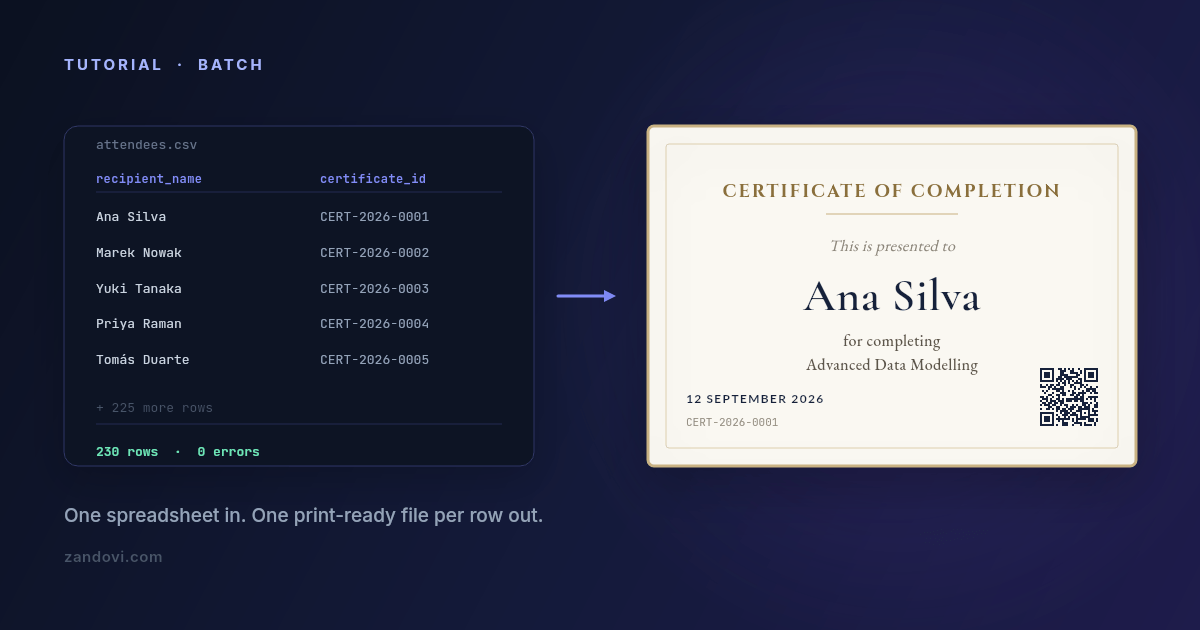
The course finished on Friday. Two hundred and thirty people attended. Each of them needs a certificate with their own name spelled correctly, the course title, the completion date, and something that makes it look like it came from an organization rather than from a word processor at 11pm. You have all of that in a spreadsheet already. The gap is turning 230 rows into 230 files. Why the usual routes hurt Mail merge. Word and Google Docs will merge names into a document, and for plain text on white paper that's fine. Certificates aren't plain text. They're a layout, with a border, a logo, a signature block, and typography that has to sit exactly where you put it. Merging into a designed document tends to nudge things by a few pixels per record, and you find out at print time. Duplicating slides. The 230-slides-in-a-deck approach. It works, and it costs an entire afternoon, and any change to the design means doing it again. Design-tool bulk features. Better, and genuinely the right tool for some jobs. The limits show up as row caps, no automation hook, and export formats that aren't print-ready. A script. If you're comfortable with code, generating certificates from a CSV in Python is a solid afternoon's work. Then you own the layout code, the font loading, and the PDF generation forever. What follows is the fourth route: design the certificate once in an editor, mark the parts that change, upload the spreadsheet, download a ZIP. Step 1: design the certificate Start from a certificate template or a blank canvas. If these will be printed, set the canvas up for print from the start: pick an A-series or US Letter preset in landscape, and set the export DPI to 300. Doing this first matters. A canvas sized for the screen and scaled up afterwards is how you end up with a soft logo on a printed certificate.Lay out the fixed parts: border, organization logo, the words "Certificate of Completion", the signature line. These never change, so they're just design. Step 2: mark what changes as variables This is the step that turns a design into a generator. Select each element that differs per person, mark it as a variable, and give it a name:Variable Element Notesrecipient_name text Set auto-fit so "Bartholomew Featherstonehaugh" and "Li Wei" both look intentional.course_title text Usually identical across the batch. Give it a default value and you can leave the column out.completion_date text Dates travel through as text, so format them in the spreadsheet exactly as they should print.certificate_id text Mark it required so a blank cell is caught rather than rendering an empty line.verify_qr QR code Encodes a verification URL. See below.Give every variable a description too. It shows up as guidance later, and if someone else ever fills the spreadsheet, that one sentence prevents most of the back-and-forth. Where a column should only ever hold a handful of known values, set its Allowed values list. Type in the real values and anything else in that column is rejected before rendering, which is the cheapest way to stop a typo becoming 230 wrong certificates. A note on the QR code. Binding a QR element to a variable lets each certificate carry its own verification link, https://yoursite.com/verify/{certificate_id}, which is how you make a certificate checkable rather than merely decorative. Keep the QR element at least 100×100 px and use the Print Safe button to get the quiet zone right; QR codes printed too small or too close to a border are the number one reason scans fail on paper.Step 3: get the CSV with the right headers Click Generate, then the Batch tab, then Download CSV Template. This gives you a CSV whose header row already matches your variable names exactly. Use it. The most common failure in bulk generation is a column called Name when the template expects recipient_name, and starting from the generated file removes that entire category of problem. Open it in Excel, Google Sheets or Numbers, and paste your data underneath. One row per certificate: recipient_name,course_title,completion_date,certificate_id,verify_qr Ana Silva,Advanced Data Modelling,12 Sep 2026,CERT-2026-0001,https://example.com/verify/CERT-2026-0001 Marek Nowak,Advanced Data Modelling,12 Sep 2026,CERT-2026-0002,https://example.com/verify/CERT-2026-0002 Yuki Tanaka,Advanced Data Modelling,12 Sep 2026,CERT-2026-0003,https://example.com/verify/CERT-2026-0003If you're building the ID and verification URL from a spreadsheet formula, double-check the first and last rows after filling down. Off-by-one errors in a fill-down are invisible until someone scans a code and lands on the wrong person's record. Step 4: upload and let validation do its job Drag the completed CSV into the upload area. Three things happen before anything renders. Your column headers are matched against the variable names, so a missing required column is flagged immediately and any column the template doesn't recognise is called out as ignored. Then every row is checked: a missing required value, a value outside a variable's allowed list, or QR data too long to encode all get reported with the row and column named. Finally, any column whose values run much longer than the default you designed around is flagged as a fit risk, so you find out that one name is three times the length of the rest before it shrinks to unreadable. You get a summary like "3 errors in 230 rows" with a table naming each one. Fix them in the spreadsheet, re-upload, re-validate. This step is the whole reason to prefer a validated batch over a script you wrote on Thursday. Catching three bad rows before rendering costs you two minutes. Catching them after you've printed and mailed 230 certificates costs considerably more.Step 5: choose your output, then submit Pick the format and resolution. Use PDF at 300 DPI for anything going to a printer or a print shop, and PNG at 2× scale for anything going into an email or a download link. Then Submit Batch. The job appears in the list below with a status of PENDING, PROCESSING, COMPLETED or FAILED, along with the row count and how long ago you submitted it. When it's done, Download Results gives you a ZIP with one file per row. If a job comes back FAILED, expanding it in the list tells you which rows failed and why. Renders that fail are refunded to your quota, and a batch rejected at validation is never charged at all, so a failed job doesn't cost you anything except the time to fix and resubmit. The row limits, stated plainly Batch jobs have a per-job row cap that depends on your plan:Plan Rows per jobFree 25Personal 100Studio 200Team 300Business 400So a 230-person course is one job on Team, two on Studio, three on Personal. The practical workaround for a larger cohort is to split the spreadsheet by cohort, session or date, which is usually how you want the files organized anyway. Sort the sheet first, then split; that way each ZIP maps to something meaningful rather than to an arbitrary row range. Every rendered row counts as one render against your monthly pool, the same as an API call. 230 certificates is 230 renders. On the $29 Personal plan that's 5,000 renders a month, so the certificates for a busy training calendar fit comfortably; on the free plan's 100 renders, a single mid-sized cohort will use most of it. There's also a maximum output resolution that varies by plan. The free plan tops out around A5 at 300 DPI, paid plans go to A4/US Letter and above. If you're producing large-format certificates, check that before designing the canvas rather than after. Making the files easy to hand out Two things worth deciding before you generate rather than after. The first is file naming. Files in the ZIP are named from your data, so having a certificate_id column pays for itself here. A ZIP of CERT-2026-0001.pdf files is trivially matchable against your attendee list. A ZIP of certificate-1.pdf files is not. The second is delivery. If you're emailing these individually, keep the same CSV as the source of truth: it already has the name, the ID, and, if you add a column, the email address. The ZIP and the sheet then line up row for row, and whatever you use to send the mail can join them without a manual matching step. When to move from the spreadsheet to the API The batch flow is a browser workflow: a person uploads a file and downloads a ZIP. That's the right shape when certificates are an event. A cohort finishes, you generate a set. It's the wrong shape when certificates are a continuous stream. If your platform issues one the moment a learner finishes a course, at unpredictable times, you want the same template called from your backend instead: one POST per completion, PDF bytes back, attached to an email or stored against the learner record. Same template, same variables, no spreadsheet. Most teams end up using both. The API covers the automated path, and the batch tab covers the "we ran a workshop and need 40 certificates by Thursday" path that never quite fits the automated one.The batch generation guide covers the dialog in detail, and the free plan gives you 100 renders a month so you can try a real cohort without a card.