Showing Posts From
Design
- 14 Jul, 2026
Designing Gift Cards People Actually Redeem
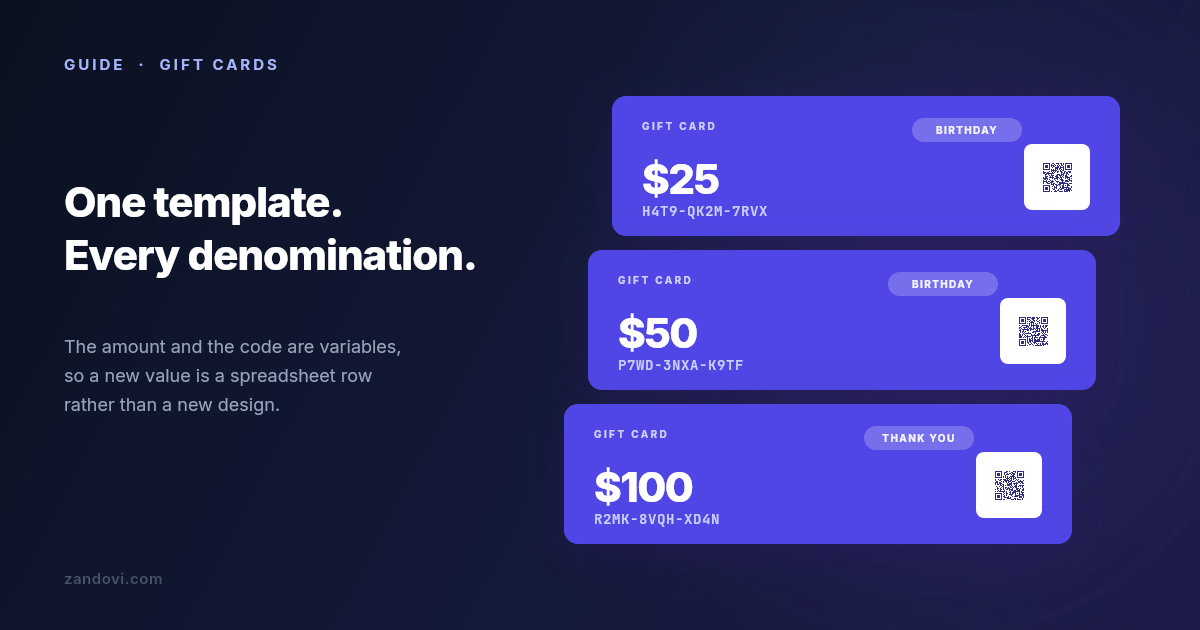
A gift card is an unusual product. Someone pays you today for something you owe later, to a person who didn't choose it. Every card that gets forgotten in a drawer looks like free revenue on this month's numbers and is really a promise sitting on your books, plus a customer who never came in. Breakage rates get quoted anywhere from a few percent to well into double digits, and the honest answer is that it depends entirely on the business. What isn't in doubt is the direction: the easier a card is to understand and use, the more of them come back through the door. A lot of that is design. So this covers what makes a card get redeemed, and then the mechanical part most guides skip: producing a whole set of denominations and codes without laying out each one by hand. Make the value unmissable The amount is the most important element on the card, and it should look like it. Give it more size and weight than anything else, including your logo. The failure mode is a card designed to be tasteful, where the value ends up as small grey text in a corner. Someone pulls it out of an envelope, can't immediately see what it's worth, and puts it back. Hold the design at arm's length. If the number isn't the first thing you read, the hierarchy is wrong. Contrast matters as much as size. A pale gold $50 on a cream background photographs beautifully and is genuinely hard to read in a dim restaurant. Make the redemption path obvious Every question a recipient has to ask costs you redemptions. The card needs to answer four things without anyone thinking about it: what it's worth, where it can be used, how to use it, and whether it expires. That last one deserves care. Gift card expiry is regulated in many places, with minimum validity periods and rules about fees, and the rules differ by country and by state. Check what applies to you rather than copying what another card does. If there's no expiry, saying so plainly is a feature worth printing. Keep the how-to-use line short and specific. "Present this card in store or enter the code at checkout" beats a paragraph of terms. If you need terms, put them on the back in small type where they belong. Design the set, not the card Here's where most gift card projects go wrong. You design a beautiful $25 card, then you need $50, $100 and $250. Then December arrives and you need a festive version of all four. Then a corporate client wants fifty with their logo on them. Designing each one separately means every future change is four to sixteen edits, and they drift apart. One gets the new logo, another keeps the old typography, and after a year your cards don't look like a family. The fix is one master template where the parts that change are variables:Variable Element Notesamount text Format it in the sheet exactly as it should print: $50, not 50.card_code text Mark it required, so a blank cell is caught rather than printing a codeless card.expires_at text Dates print exactly as written, so settle the format in the spreadsheet.occasion text Set its Allowed values to the occasions you actually produce.redeem_qr QR code Encodes the redemption URL for that specific card.Now a new denomination is a row in a spreadsheet, and a rebrand is one edit to one template.Codes that survive being typed by a human If your cards carry a code, someone will read it off a physical card and type it into a phone. Design for that. Drop ambiguous characters from your alphabet. 0 and O, 1 and I and l, 5 and S, 8 and B all cause support tickets, and you lose nothing by excluding them. Group the code so the eye can track it: H4T9-QK2M-7RVX is meaningfully easier to transcribe than H4T9QK2M7RVX. Set the code in a monospace font. Proportional fonts make similar characters harder to distinguish at a glance, and monospace signals "this is a code you type" without a label saying so. Then mark card_code required, so a batch with a blank code fails at upload rather than at the print shop. Generate the codes in the spreadsheet and check the first and last rows after filling down — an off-by-one there is invisible until someone tries to redeem. The QR code beside it does the same job with less friction. Bind a QR element to a variable and each card carries its own redemption link, so a phone can skip the typing entirely. Keep it at least 100×100 px and use the Print Safe button to get the quiet zone right, because a QR crowded against a card edge is a QR that doesn't scan. Match the occasion without forking the design A birthday card and a corporate thank-you shouldn't feel the same, but they should feel like they came from the same business. Handle this with the occasion variable and a swappable image element rather than separate templates. The layout, typography and logo placement stay fixed. The photograph and one or two colours change. Stock imagery is searchable inside the editor across Unsplash, Pexels and Pixabay, so sourcing a seasonal image doesn't mean leaving the app. The discipline is keeping the structure identical across occasions. That's what makes a set of cards read as a range rather than as four unrelated designs. Produce the whole set at once With the template built, the set is a spreadsheet. Download the CSV template from the Batch tab so the headers already match your variable names: amount,card_code,expires_at,occasion,redeem_qr $25,H4T9-QK2M-7RVX,31 Dec 2027,Birthday,https://example.com/gc/H4T9QK2M7RVX $50,P7WD-3NXA-K9TF,31 Dec 2027,Birthday,https://example.com/gc/P7WD3NXAK9TF $100,R2MK-8VQH-XD4N,31 Dec 2027,Thank You,https://example.com/gc/R2MK8VQHXD4NUpload it and every row is validated before anything renders. A missing card code, an occasion outside the allowed values you set on that variable, a column whose name doesn't match the template: all flagged with the row named, so you fix the sheet rather than the output. Then submit and download a ZIP with one file per row. Row caps per job are 25 on Free, 100 on Personal, 200 on Studio, 300 on Team and 400 on Business, so a run of 500 corporate cards gets split across a few jobs. Split them by denomination or by client and each ZIP is something you can hand over as it is.Print and digital are different exports For physical cards, export PDF at 300 DPI. Set the canvas up in millimetres or inches from the start rather than converting later, and pick the DPI before you design, since the options are fixed at 96, 150 and 300. There's no bleed or crop-mark support, so if your design runs colour to the edge, ask your printer what bleed they need and add it by oversizing the canvas yourself, keeping the trim area clear of anything important. Worth knowing before you send the file rather than after. For emailed cards, PNG at 2× scale is the right output. Same template, different export, so the digital and physical versions can't drift apart. What this doesn't do Zandovi generates the card. It doesn't track balances, mark a code as spent, or tell you whether card H4T9-QK2M-7RVX has already been used. That lives in your POS or your ecommerce platform, and it's the part that turns a printed code into a working gift card. Worth being clear about, because a beautifully produced set of cards with no system behind the codes is a set of cards anyone can spend twice. When the spreadsheet stops fitting Batch generation suits how most businesses actually buy gift cards: a run before the holidays, a corporate order, a restock. It stops fitting when cards are sold online and expected instantly. If someone buys a digital gift card at 11pm and wants it in their inbox, you want the same template called from your backend: one POST carrying that card's amount and code, PNG or PDF bytes back, attached to the delivery email. Same template, same variables, nobody at a keyboard. What this costs A run of 100 cards is 100 renders. The free plan's 100 renders a month covers a first batch or a proper test. Personal at $29/month for 5,000 renders covers a seasonal programme comfortably, and manual exports from the editor don't count against it on any paid plan.There are eleven gift card templates in the gallery to start from, and the batch generation guide walks through the upload and validation step by step.