Showing Posts From
Automation
- 15 Aug, 2026
Generating Images Inside an n8n, Make or Zapier Workflow (With Just an HTTP Node)
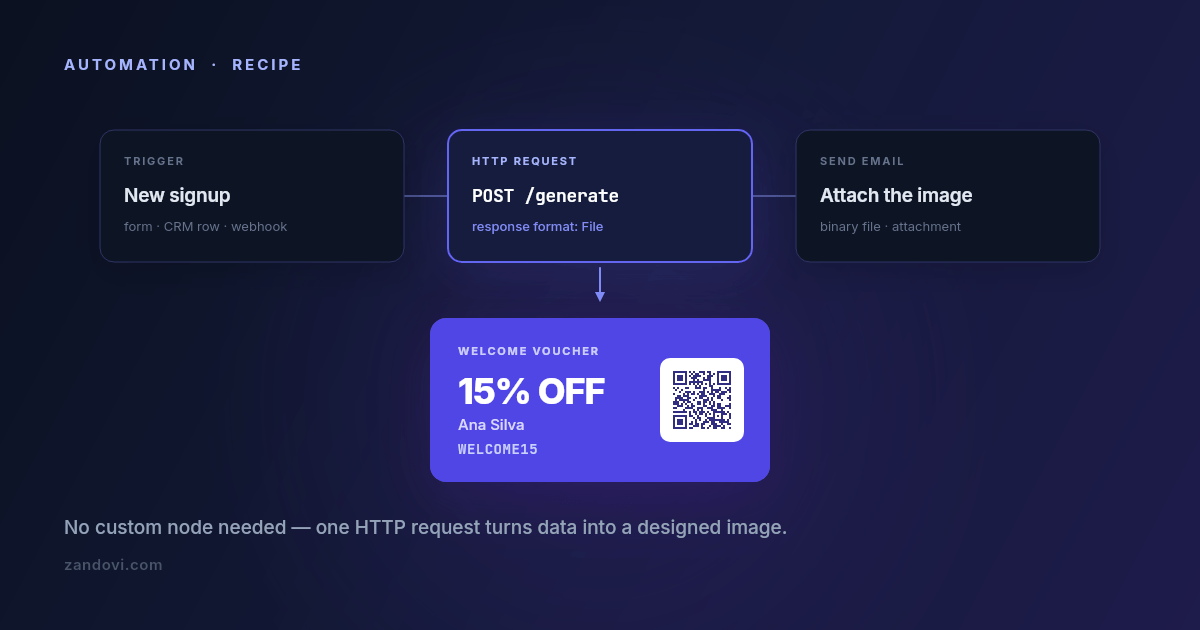
Automation platforms are very good at moving text and data around. A form submission becomes a database row becomes a Slack message becomes an email, and none of it takes code. Then someone asks for the email to include a personalized voucher with the recipient's name and a scannable code on it, and the workflow stops. Every node in the chain handles strings and JSON; none of them draws. The usual workarounds are all bad in the same way. Pre-generating a few hundred images defeats the point of personalizing them. Passing the data to a designer puts a human in a loop that was supposed to be automatic. Spinning up a small rendering service means you now operate a small rendering service. The fix is one node: an HTTP request that sends your values and receives an image back. Up front: there's no native node yet We don't ship an n8n community node, a Make app, or a Zapier integration today. It's on the roadmap and the n8n one is first, but it doesn't exist as you read this, and telling you otherwise would waste your afternoon. What does exist is a plain REST API that returns image bytes, which every one of these platforms can call with its built-in HTTP module. That's what this post sets up. It's four or five fields of configuration, and it works today. The request you're making One endpoint does the work: POST https://app.zandovi.com/api/v1/templates/{templateId}/generateWith a header for your API key, a JSON body of variable values, and a response that is the image itself: raw bytes, not a JSON envelope with a URL inside it. { "variables": { "customer_name": "Ana Silva", "discount_code": "WELCOME15", "expires_at": "30 Sep 2026", "voucher_qr": "https://example.com/redeem/WELCOME15" }, "format": "png", "options": { "scale": 2 } }The one design decision to get right before you touch the workflow: which parts of the image are variables. Any text, image, QR code or barcode element in the template can be one. In the example above, voucher_qr is a QR element whose content comes from the request, so every generated voucher carries its own redemption link. You'll also want the template's exact variable names. Ask the template itself: GET https://app.zandovi.com/api/v1/templates/{templateId}The response lists each variable's name, type and whether it's required. Read calls like this don't consume render quota, so you can call it as often as you like while building. n8n n8n is the most straightforward of the three because its HTTP Request node handles binary responses natively. Start by storing the key as a credential. Create a Header Auth generic credential with name X-Api-Key and your key as the value. Don't paste the key into the node. A credential keeps it out of exported workflow JSON, which matters the first time you share a workflow with someone. Then add an HTTP Request node and configure it:Field ValueMethod POSTURL https://app.zandovi.com/api/v1/templates/YOUR_TEMPLATE_ID/generateAuthentication Generic Credential Type → Header Auth → the credential aboveSend Body on, JSONBody the JSON above, with expressions in place of literalsResponse → Format FileThat last setting is the one people miss. Left on the default, n8n tries to parse image bytes as JSON and you get an unhelpful error. Set the response format to File and the image arrives as binary data on the item, ready for the next node. Use expressions for the values rather than hard-coding them, so they pull from earlier nodes: {{ $json.customer_name }} {{ $json.discount_code }} {{ new Date().toLocaleDateString('en-GB', { day: 'numeric', month: 'short', year: 'numeric' }) }}Then do something with it. The binary property flows straight into a Send Email node as an attachment, a Google Drive upload, a Slack file post, or an S3 node. This is the payoff: the image is now just another piece of data in the workflow.Make.com Same shape, different labels. Use the HTTP → Make a request module, with the method set to POST and the URL pointing at the generate endpoint. Add X-Api-Key and Content-Type headers, set the body type to Raw or JSON with your variable values mapped in from earlier modules, and turn Parse response off. Leaving "Parse response" off is the equivalent of n8n's File setting. It tells Make to keep the binary payload intact rather than trying to interpret it. The result appears as file data that downstream modules (Email, Google Drive, Dropbox) accept directly. Zapier Zapier is the fiddliest of the three, because its webhook step is built around text and JSON responses rather than binary payloads. The Webhooks by Zapier → Custom Request action (a premium feature) will make the POST. What you do with the response depends on what comes next: attaching raw binary to a later step is where people typically run into trouble. Two paths tend to work better. You can use a Code by Zapier step to make the request and handle the response yourself, base64-encoding it if the next step needs a string. Or you can render, store, then link: push the image into your own storage and pass the resulting URL along, so every subsequent Zapier step is handling a plain string. If your automation lives entirely in Zapier and images are central to it, be honest with yourself about whether the extra steps are worth it versus running this one piece elsewhere. Three details that will save you a support ticket Deduplicate in the workflow, because the API won't do it for you. There is no idempotency key: every call to the generate endpoint renders again and spends another render, even when the variables are identical. Automation platforms retry steps more often than people expect, on their own schedule, so a step that looks like it ran once may have run three times. Guard it on your side. Store something per event, like a rendered_at timestamp or the resulting file URL on the record that triggered the workflow, then put an IF node in front of the HTTP request that skips it when that field is already set. It's two extra nodes, and it's the difference between a quota you can predict and one you can't explain. Branch on the error code, not just the status. Two different 429s exist. One has code: RATE_LIMIT_EXCEEDED and means slow down, so retry after a short pause. The other has code: QUOTA_EXCEEDED and means you're out of renders for the billing period, where retrying achieves nothing until the reset. A workflow that treats them identically will either hammer the endpoint pointlessly for two weeks or give up on a transient blip. 502 and 503 are worth an exponential backoff. n8n's "Retry On Fail" and Make's error-handler routes both cover this without custom logic. Failed renders are refunded automatically, so a retry after a genuine service error doesn't cost you twice. Watch the quota headers. Every successful render returns X-Quota-Remaining and X-Quota-Reset. A tiny branch in the workflow that posts to Slack when remaining drops below some threshold turns "the vouchers stopped sending" into "heads up, we're at 400 renders left". Cheap to build, disproportionately useful. Recipes worth stealing Welcome voucher on signup. A new row in your CRM or a new form submission triggers the flow, which generates a voucher image carrying the customer's name, a code, and a QR pointing at the redemption URL, then attaches it to the welcome email. Personalized, and nobody touched it. Certificate on course completion. A completion webhook from your LMS triggers a PDF certificate at 300 DPI with the learner's name and a verification QR, which gets emailed with a copy dropped in Drive. This is the automated counterpart to the spreadsheet batch flow, and it's the same template. Social card on new content. A new CMS entry generates a branded card with the title and author, which goes to Slack for approval or straight to the scheduling tool. The design lives in the editor, so marketing can restyle it without asking anyone to redeploy. What to know before you build on this There's no native node yet, so you're wiring HTTP modules. That's a handful of fields, but it isn't a one-click install, and the UI labels above move slightly between platform versions. The concepts hold; the exact field names may not. Rate limits are real. The API throttles per second, so a loop firing hundreds of parallel requests will hit it. Keep concurrency modest and let the retry logic handle the rest. Renders are metered, including the ones your workflow generated by accident during testing. The free tier's 100 renders a month is enough to build and test a workflow properly; a production automation firing on every signup needs a paid plan. Which brings up the last one: watch your test runs. The single fastest way to burn a free tier is a misconfigured trigger firing 80 times while you debug. Pin sample data while building and only go live once the node is right.The API quickstart has the same request in curl, JavaScript and Python if you'd rather test it outside the workflow first. And if you'd find a native n8n node useful, tell us. The order we build integrations in is decided by who asks.